


BambooHR AI agent for your HR help desk.
PTO requests, pay queries, policy questions, and onboarding workflows handled in Slack or Teams from live BambooHR data. No developer. No portal login. No HR ticket.
IT Teams of all sizes trusts Workativ AI to automate IT Operations & Support

BambooHR now has AI in Slack. Three things it still can't do.

Ask BambooHR answers. It doesn't act.
Ask BambooHR gives employees their PTO balance in Slack. It cannot submit the request, update the record, or approve it.

New hire in BambooHR still needs IT to act
BambooHR marks the hire. Okta provisioning, IT access, and the day-1 checklist still need a human to coordinate.

One BambooHR account per Slack workspace
One BambooHR account per Slack workspace. Multi-entity orgs and teams across workspaces hit that ceiling on day one.
Every BambooHR HR request resolved in Slack. No portal. No HR ticket.
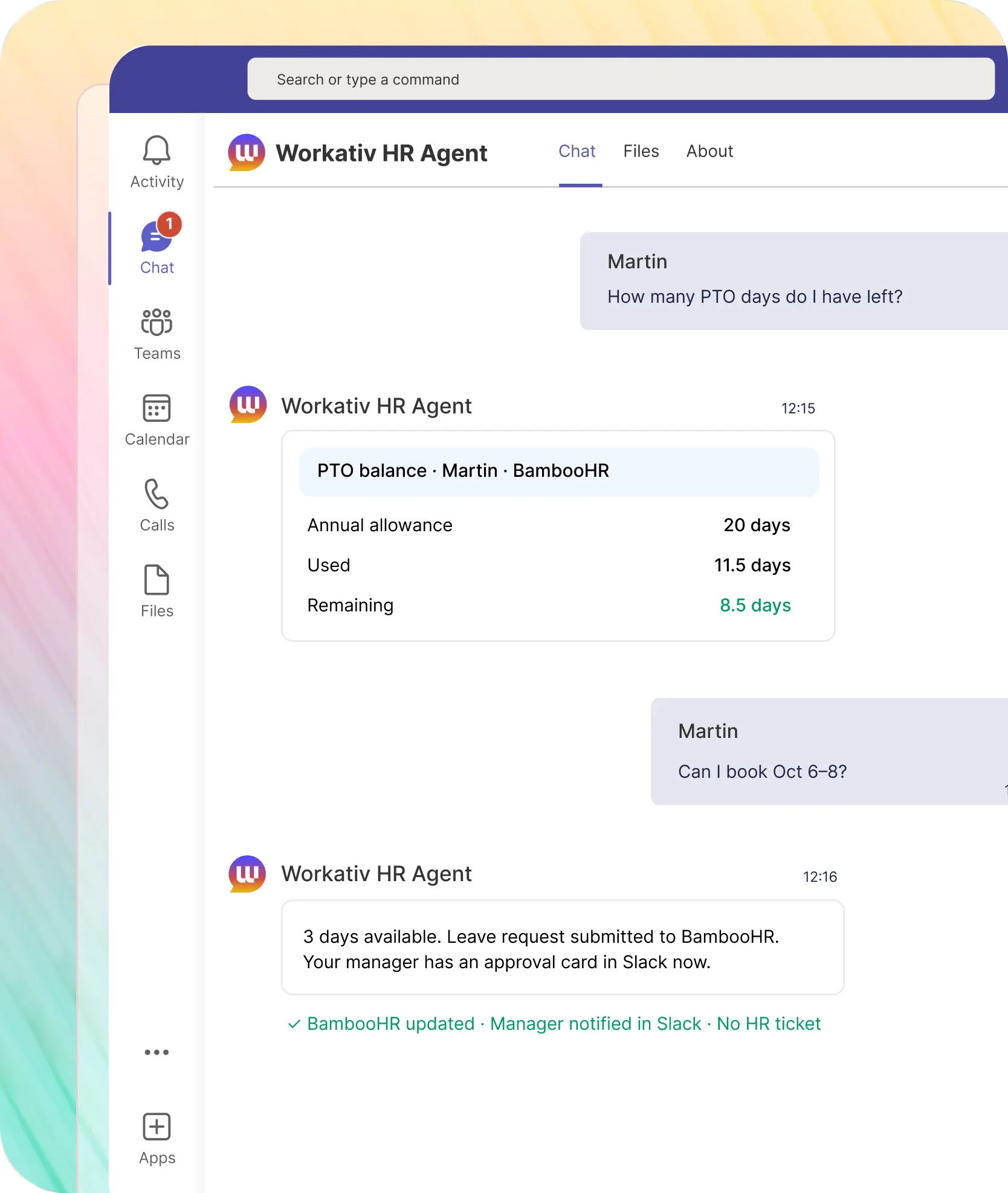
Employee asks in Slack. Workativ reads from BambooHR, takes the action, and confirms all in the same thread.
PTO balance from BambooHR in seconds. Leave submitted and approved all in Slack. Ask BambooHR shows the balance. Workativ submits the request.

Live balance pulled from BambooHR same-day accruals reflected
Leave request submitted through BambooHR HR not in the chain
Manager approves in Slack BambooHR record updated on approval
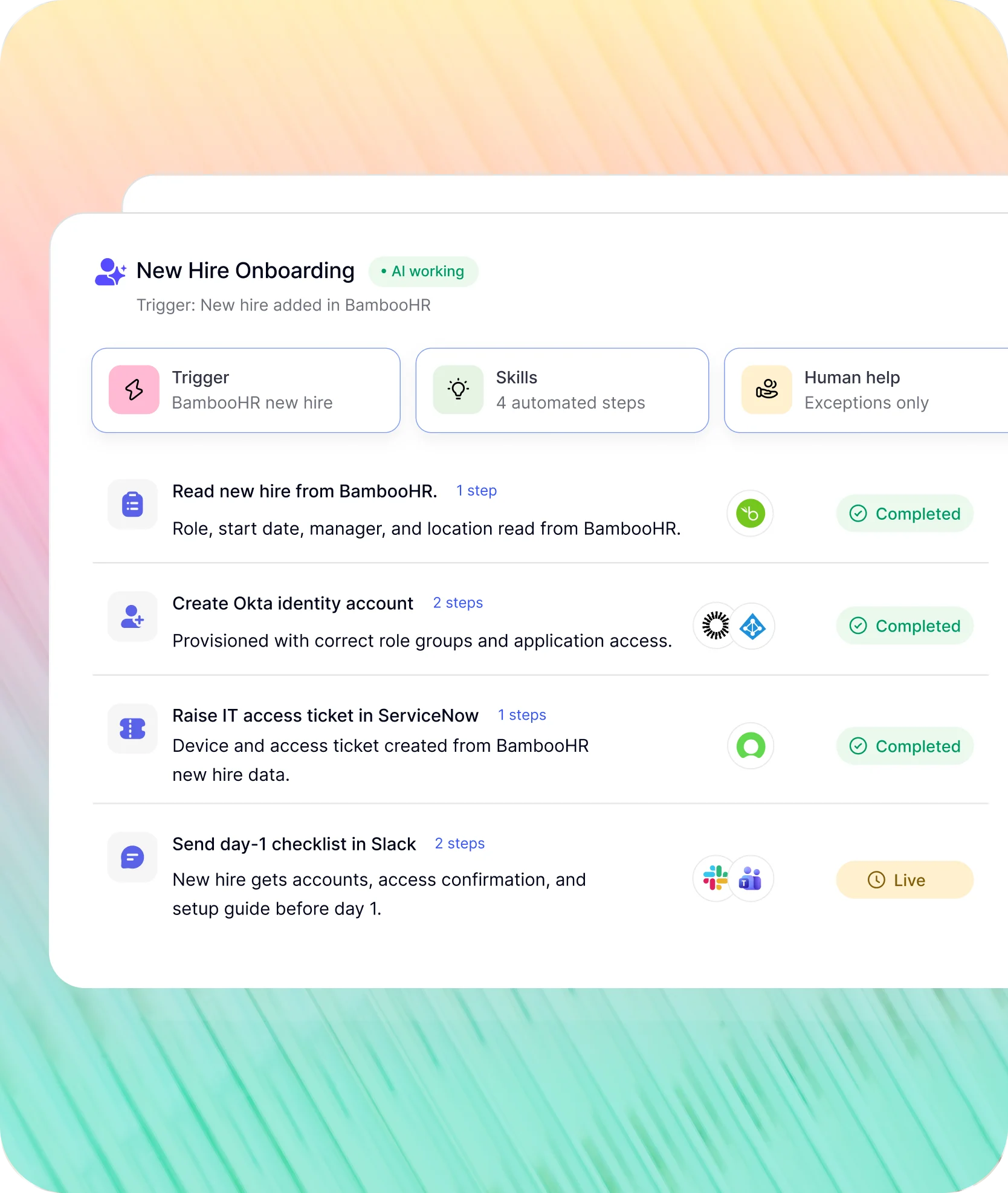
BambooHR events trigger workflows across every connected system. No one coordinates manually.
BambooHR fires the event. Workativ handles Okta, Azure AD, ServiceNow, and Slack. HR sets it up once.
New hire in BambooHR. Workativ provisions Okta, raises the IT ticket, and sends the day-1 checklist before they start.
Triggered by new hire event in BambooHR no manual kickoff
Okta identity account created with correct role and groups
Day-1 checklist sent to new hire in Slack before they start
How GoTo resolved 80% of HR queries automatically with BambooHR connected to Workativ in Slack.
"Workativ has been with us every step of the way. From our first IT support use case to HR, and soon Procurement. The platform grows with us, and so does the team behind it. It's rare to find a solution that's both powerful and genuinely easy to manage."

Imran Abid
IT Operations Leader · NMDC Group

Connect your Freshservice service desk to Slack in three steps. No developer. No Freshworks partner.
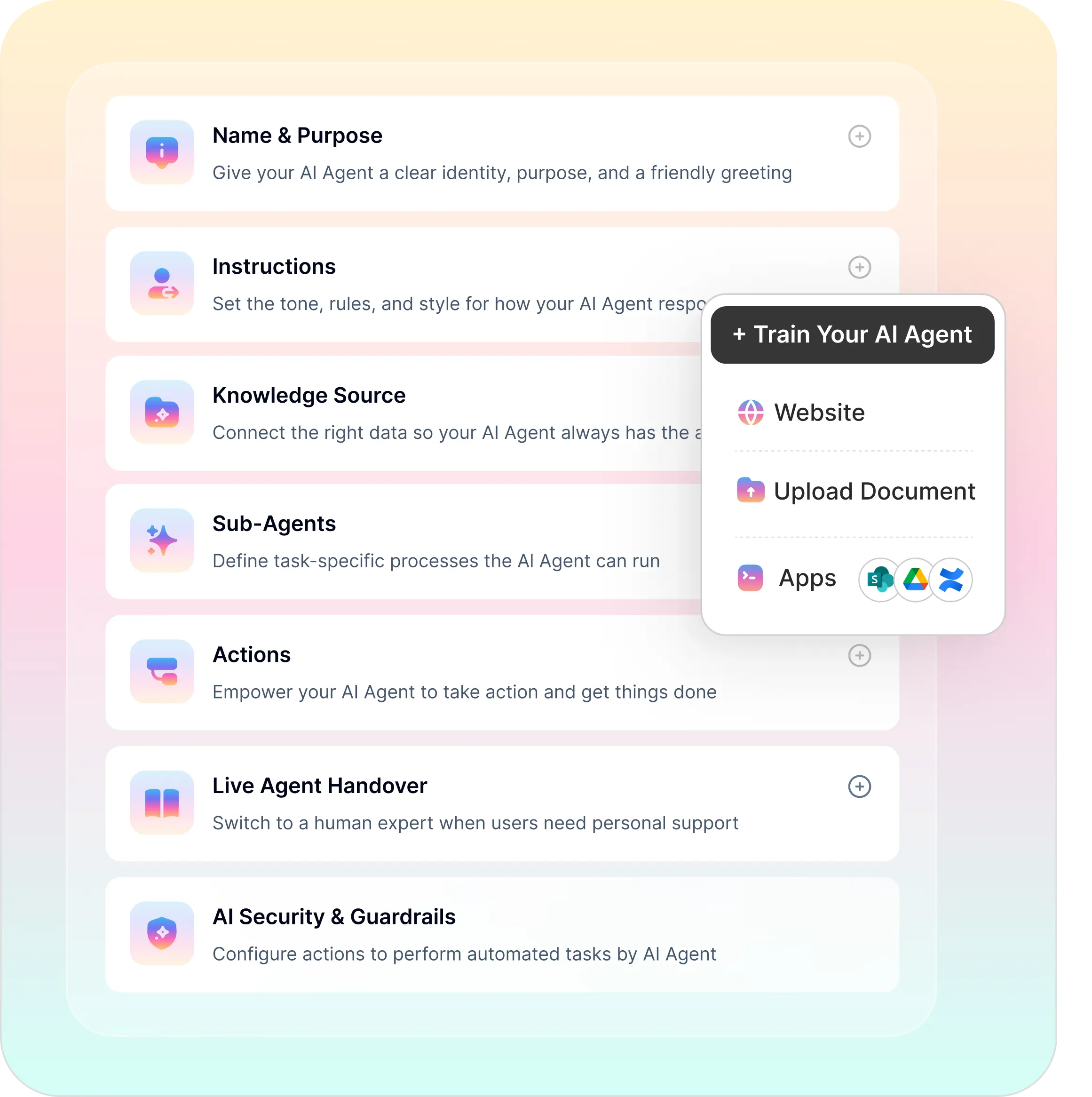
Built for HR teams without a developer. BambooHR stays your system of record.
No-code builder, agentic RAG, workflow automation, and security without an implementation project.
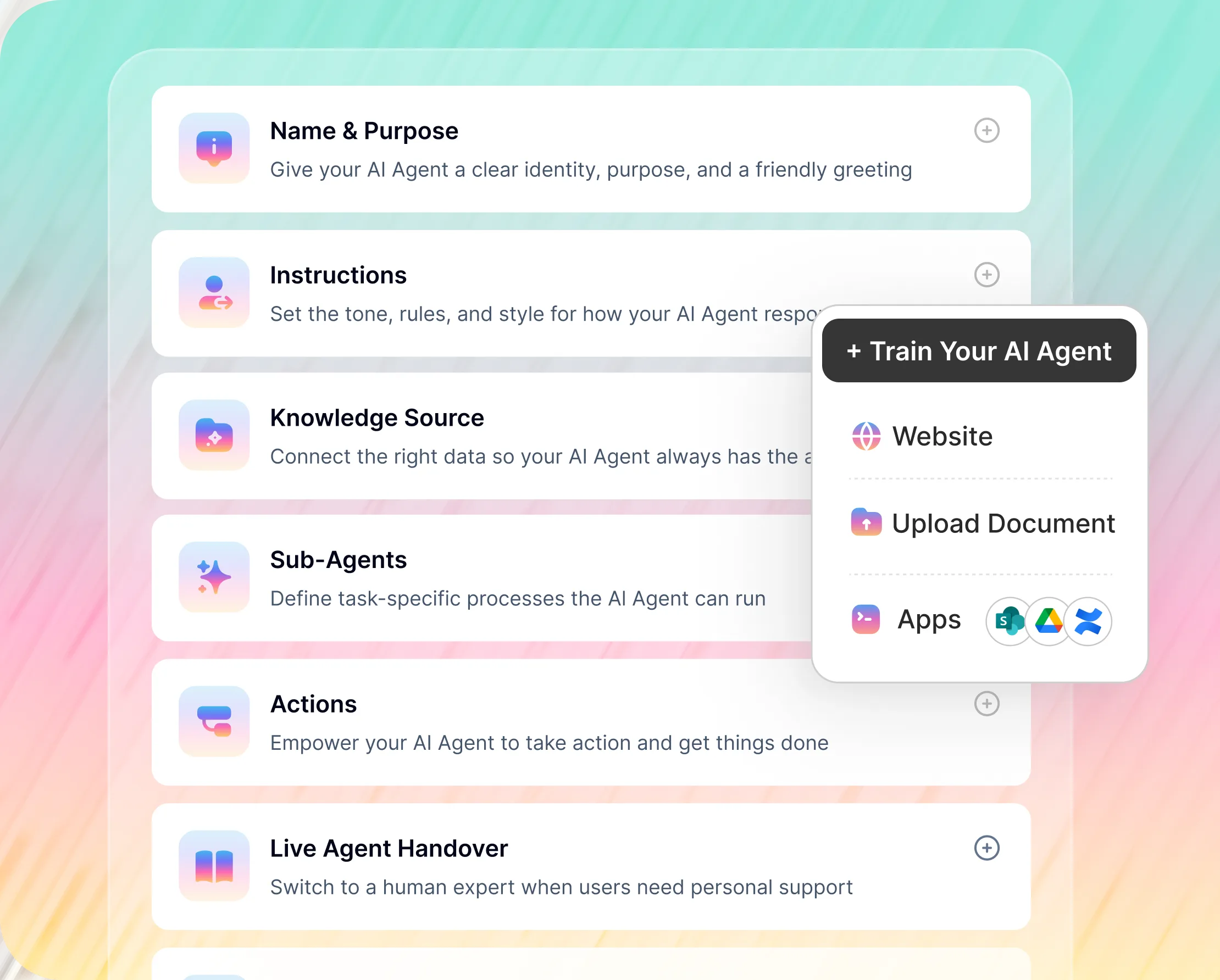
No-Code BambooHR AI Agent Builder
BambooHR PTO, payslip, personal updates, and onboarding all configured point-and-click
Live agent handover when employees need a human HR conversation
BambooHR module permissions set by HR, not an implementation consultant
BambooHR now has two AI options. Here is where Workativ sits alongside both.
Ask BambooHR handles conversational questions. Bamboo AI (private beta) covers reporting and scheduling inside BambooHR. Workativ takes action in Slack and connects BambooHR to your full stack.
What matters to HR |  |  |  |
|---|---|---|---|
What matters to HR |  | BambooHR platform + Slack via app | Inside BambooHR only |
Submits PTO requests | |  | |
Updates employee records | | | |
Cross-system automation | | | BambooHR reporting & scheduling |
New hire onboarding trigger | | | |
Multiple BambooHR accounts | | One account per Slack workspace | Inside BambooHR only |

When Ask BambooHR is enough: Your employees only need to check balances or read policy answers they don't submit requests, update records, or need onboarding workflows to run across multiple systems.
When to add Workativ: Employees ask in Slack and expect the action to happen not just the answer. New hires need IT provisioned from BambooHR. Terminations need Okta disabled the same day. Your org has multiple BambooHR accounts. Workativ and Ask BambooHR run alongside each other BambooHR stays your system of record.
BambooHR plus every system your employees and HR team work across.


'/%3e%3cpath%20d='M7.53747%209.7499L4.18595%209.72912C3.89511%209.72912%203.66314%209.49022%203.66314%209.20285C3.66314%209.08859%203.70122%208.98126%203.76701%208.89124L8.69389%202.30244C10.2589%203.46925%2010.5809%205.68513%209.41059%207.2501L7.53747%209.7499Z'%20fill='url(%23paint1_linear_217_318)'/%3e%3cdefs%3e%3clinearGradient%20id='paint0_linear_217_318'%20x1='7.3717'%20y1='1.41211'%20x2='9.07645'%20y2='11.0799'%20gradientUnits='userSpaceOnUse'%3e%3cstop%20stop-color='%239DC9FC'/%3e%3cstop%20offset='0.6866'%20stop-color='white'/%3e%3c/linearGradient%3e%3clinearGradient%20id='paint1_linear_217_318'%20x1='9.68512'%20y1='1.62241'%20x2='6.91576'%20y2='7.45173'%20gradientUnits='userSpaceOnUse'%3e%3cstop%20stop-color='%239DC9FC'/%3e%3cstop%20offset='0.7152'%20stop-color='white'/%3e%3c/linearGradient%3e%3c/defs%3e%3c/svg%3e)


%20--%3e%3csvg%20version='1.1'%20id='Layer_1'%20xmlns='http://www.w3.org/2000/svg'%20xmlns:xlink='http://www.w3.org/1999/xlink'%20x='0px'%20y='0px'%20viewBox='0%200%20512%20512'%20style='enable-background:new%200%200%20512%20512;'%20xml:space='preserve'%3e%3cstyle%20type='text/css'%3e%20.st0{fill:%23F7F7F7;}%20.st1{fill:%2328E4C3;}%20.st2{fill:url(%23SVGID_1_);}%20.st3{fill:url(%23SVGID_2_);}%20%3c/style%3e%3ccircle%20class='st0'%20cx='256'%20cy='256'%20r='245.5'/%3e%3cg%3e%3cg%3e%3cpath%20class='st1'%20d='M304.7,405.6'/%3e%3c/g%3e%3c/g%3e%3cg%3e%3cg%3e%3cpath%20class='st1'%20d='M305.8,353'/%3e%3c/g%3e%3c/g%3e%3clinearGradient%20id='SVGID_1_'%20gradientUnits='userSpaceOnUse'%20x1='388.1461'%20y1='99.0534'%20x2='204.4846'%20y2='204.5899'%20gradientTransform='matrix(1%200%200%20-1%200%20514)'%3e%3cstop%20offset='0.18'%20style='stop-color:%230052CC'/%3e%3cstop%20offset='1'%20style='stop-color:%232684FF'/%3e%3c/linearGradient%3e%3cpath%20class='st2'%20d='M119.9,330.3c-3,4.9-6.4,10.7-9.3,15.3c-2.6,4.4-1.2,10,3.1,12.7l60.7,37.4c4.4,2.7,10.1,1.3,12.9-3%20c0,0,0.1-0.1,0.1-0.1c2.4-4.1,5.6-9.3,9-15c24-39.7,48.2-34.8,91.9-14l60.2,28.6c4.7,2.2,10.2,0.2,12.4-4.4c0-0.1,0.1-0.2,0.1-0.3%20l28.9-65.4c2-4.7,0-10.1-4.7-12.2c-12.7-6-38-17.9-60.7-28.9C242.6,241.2,173.1,243.7,119.9,330.3z'/%3e%3clinearGradient%20id='SVGID_2_'%20gradientUnits='userSpaceOnUse'%20x1='613.0198'%20y1='1773.9866'%20x2='429.3116'%20y2='1879.5697'%20gradientTransform='matrix(-1%200%200%201%20736.83%20-1676.71)'%3e%3cstop%20offset='0.18'%20style='stop-color:%230052CC'/%3e%3cstop%20offset='1'%20style='stop-color:%232684FF'/%3e%3c/linearGradient%3e%3cpath%20class='st3'%20d='M392.1,181.9c3-4.9,6.4-10.7,9.3-15.3c2.6-4.4,1.2-10-3.1-12.7l-60.7-37.4c-4.3-2.9-10.1-1.7-13,2.5%20c-0.1,0.2-0.2,0.4-0.3,0.6c-2.4,4.1-5.6,9.3-9,15c-24,39.7-48.2,34.8-91.9,14l-60-28.5c-4.7-2.2-10.2-0.2-12.4,4.4%20c0,0.1-0.1,0.2-0.1,0.3L122,190.2c-2,4.7,0,10.1,4.7,12.2c12.7,6,38,17.9,60.7,28.9C269.4,271,338.9,268.4,392.1,181.9z'/%3e%3c/svg%3e)



%20--%3e%3csvg%20version='1.1'%20id='Layer_1'%20xmlns='http://www.w3.org/2000/svg'%20xmlns:xlink='http://www.w3.org/1999/xlink'%20x='0px'%20y='0px'%20viewBox='0%200%20512%20512'%20style='enable-background:new%200%200%20512%20512;'%20xml:space='preserve'%3e%3cstyle%20type='text/css'%3e%20.st0{fill:%23EB3C00;}%20.st1{fill:%23FFFFFF;}%20%3c/style%3e%3ccircle%20class='st0'%20cx='256'%20cy='256'%20r='245.5'/%3e%3cpath%20class='st1'%20d='M152.2,332.7v-152L286.7,131l73.1,23.4V359l-73.1,22L152.2,332.7l134.4,16.2V171.9L199,192.4v119.8L152.2,332.7%20z'/%3e%3c/svg%3e)

'%3e%3cpath%20d='M1.86774%200H2.41284C2.55325%200.0357914%202.8438%200.0814543%202.96023%200.144319C3.57556%200.476574%204.24389%200.994086%204.78094%201.44029C4.90785%201.49857%205.14031%201.69076%205.26616%201.78501L6.30254%202.56565L9.23874%204.76784L9.98605%205.32579C10.1165%205.42327%2010.3896%205.61784%2010.4874%205.73305C10.5933%205.62723%2010.7819%205.49083%2010.9035%205.39513C11.2293%205.13895%2011.5711%204.89897%2011.9015%204.64888L14.841%202.43616C15.2641%202.11793%2015.808%201.74101%2016.2059%201.4114C16.7548%201.01773%2017.2984%200.503308%2017.8952%200.193124C18.0888%200.0925009%2018.3311%200.0707975%2018.4996%200.00453492L18.511%200H19.1089C19.2716%200.0419345%2019.4446%200.0664859%2019.6017%200.126337C20.3949%200.428494%2020.8251%201.03647%2020.9795%201.84719V4.05546L17.6977%206.51872L16.7256%207.24655C16.6175%207.32813%2016.3229%207.56223%2016.2176%207.62326L16.2116%207.64067C16.0556%207.74125%2015.7554%207.98423%2015.5914%208.10717L14.2347%209.12565C12.9949%2010.0567%2011.7226%2010.9908%2010.4942%2011.9326C10.3311%2011.8196%2010.1521%2011.6753%209.99028%2011.5543L8.91562%2010.7499L6.14505%208.67116C5.6887%208.32244%205.22946%207.97753%204.76737%207.63644L4.76105%207.62385C4.64747%207.54843%204.4662%207.40207%204.35254%207.31617L3.58531%206.74057L0.993507%204.79937C0.666643%204.55579%200.329975%204.28777%200%204.0539V1.89895C0.0211067%201.8406%200.034732%201.7287%200.0477586%201.66355C0.195443%200.924862%200.778193%200.297181%201.50398%200.095359C1.61897%200.0633797%201.74239%200.0411929%201.85419%200.00451034L1.86774%200Z'%20fill='%23EB4337'/%3e%3cpath%20d='M18.5112%200H19.109C19.2718%200.0419345%2019.4448%200.0664859%2019.6018%200.126337C20.395%200.428494%2020.8252%201.03647%2020.9797%201.8472V4.05546L17.6978%206.51872L16.7258%207.24655C16.6176%207.32813%2016.3231%207.56223%2016.2177%207.62326C16.2065%207.10816%2016.2151%206.56484%2016.215%206.04638L16.2148%203.13227L16.2154%201.98927C16.2154%201.85241%2016.2236%201.52684%2016.2061%201.4114C16.755%201.01773%2017.2986%200.503308%2017.8953%200.193124C18.089%200.0925009%2018.3312%200.0707975%2018.4998%200.00453492L18.5112%200Z'%20fill='%23FCBC03'/%3e%3cpath%20d='M1.86774%200H2.41284C2.55325%200.0357914%202.8438%200.0814543%202.96023%200.144319C3.57556%200.476574%204.24389%200.994086%204.78094%201.44029C4.75802%201.55136%204.76536%201.81314%204.76577%201.93571L4.7683%202.76769L4.76727%206.06197L4.76854%207.06889C4.76879%207.22294%204.77708%207.48131%204.76105%207.62385C4.64746%207.54843%204.4662%207.40207%204.35254%207.31617L3.58531%206.74057L0.993506%204.79937C0.666643%204.5558%200.329975%204.28777%200%204.0539V1.89895C0.0211067%201.8406%200.034732%201.7287%200.0477586%201.66355C0.195443%200.924862%200.778193%200.297181%201.50398%200.095359C1.61897%200.0633798%201.74239%200.0411929%201.85419%200.00451034L1.86774%200Z'%20fill='%23C62220'/%3e%3cpath%20d='M0%204.05371C0.329975%204.28758%200.666643%204.5556%200.993507%204.79918L3.58531%206.74038L4.35254%207.31598C4.4662%207.40188%204.64747%207.54824%204.76105%207.62365L4.76737%207.63625C4.79294%207.81891%204.78411%208.19988%204.78406%208.39833L4.78312%209.71796L4.78339%2014.2476C4.7834%2014.4489%204.8101%2015.6601%204.76016%2015.7263C4.75851%2015.7284%204.75656%2015.7304%204.75498%2015.7326C4.75244%2015.7361%204.75024%2015.74%204.74778%2015.7435C4.7463%2015.7457%204.74469%2015.7477%204.74315%2015.7498H1.23433C1.02953%2015.6658%200.870008%2015.6564%200.656526%2015.5145C0.258114%2015.2497%200.102217%2014.9456%200%2014.4978V4.05371Z'%20fill='%234185F5'/%3e%3cpath%20d='M20.9794%204.05566V14.5025C20.828%2015.1172%2020.5387%2015.5356%2019.8875%2015.6981C19.8377%2015.7104%2019.7443%2015.7302%2019.7008%2015.7502H16.235C16.1758%2015.6436%2016.1987%2013.9178%2016.1987%2013.683L16.199%2010.2145L16.1984%208.51668C16.1982%208.31838%2016.1872%207.81396%2016.2115%207.64088L16.2175%207.62347C16.3228%207.56244%2016.6174%207.32834%2016.7255%207.24676L17.6976%206.51892L20.9794%204.05566Z'%20fill='%2333A953'/%3e%3c/g%3e%3cdefs%3e%3cclipPath%20id='clip0_1380_1288'%3e%3crect%20width='20.9795'%20height='15.75'%20fill='white'/%3e%3c/clipPath%3e%3c/defs%3e%3c/svg%3e)
%20--%3e%3csvg%20version='1.1'%20id='Layer_1'%20xmlns='http://www.w3.org/2000/svg'%20xmlns:xlink='http://www.w3.org/1999/xlink'%20x='0px'%20y='0px'%20viewBox='0%200%20512%20512'%20style='enable-background:new%200%200%20512%20512;'%20xml:space='preserve'%3e%3cstyle%20type='text/css'%3e%20.st0{fill:%230062FF;}%20.st1{fill:%23FFFFFF;}%20%3c/style%3e%3ccircle%20class='st0'%20cx='256'%20cy='256'%20r='245.5'/%3e%3cpath%20class='st1'%20d='M256,162.5l-91,58.2l91,58.2l-91,58.2l-91-59.1l91-58.2l-91-57.3l91-58.2L256,162.5z%20M164.1,355.5l91-58.2%20l91,58.2l-91,58.2L164.1,355.5z%20M256,278.1l91-58.2l-91-57.3l91-58.2l91,58.2l-91,58.2l91,58.2l-91,58.2L256,278.1z'/%3e%3c/svg%3e)


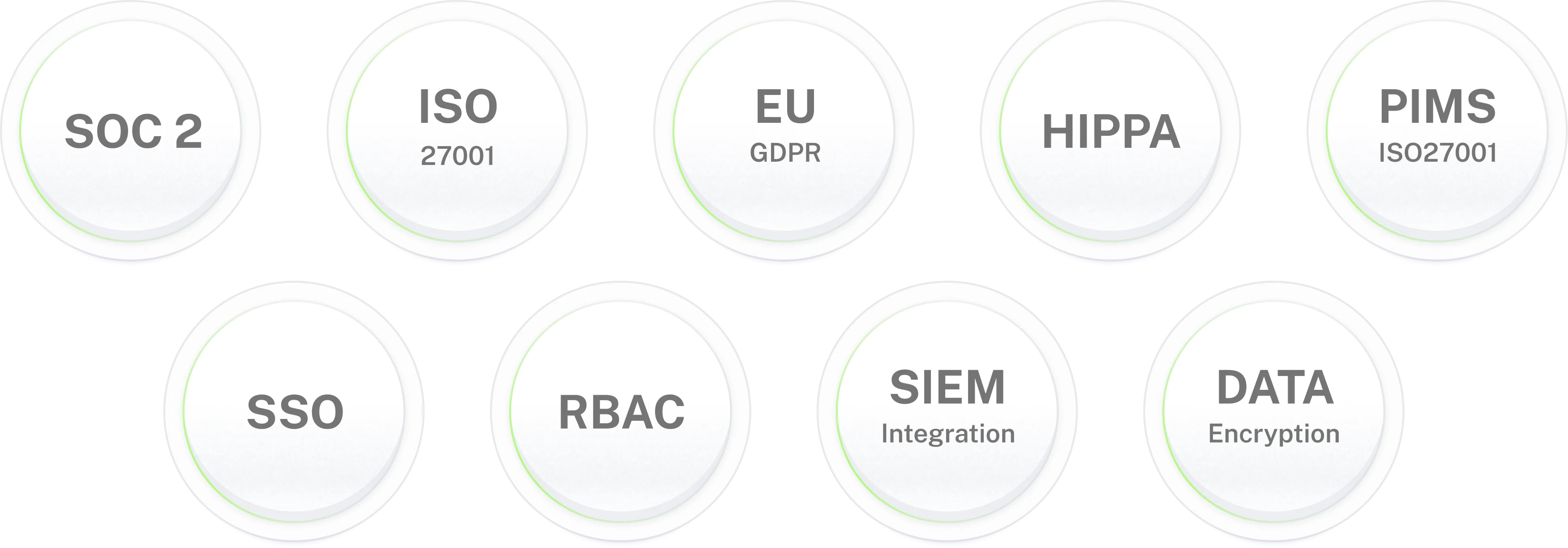
Enterprise-grade security. For HR data that matters.
BambooHR AI agent
for your HR help desk
80% of BambooHR HR queries handled without HR involvement. New hire onboarding running from BambooHR events.
Frequently asked questions
BambooHR AI agent frequently asked questions
What is a BambooHR AI agent?
A BambooHR AI agent connects to your BambooHR account and lets employees check PTO balances, submit leave requests, access payslips, update personal details, and get HR policy answers in Slack or Microsoft Teams without logging into BambooHR. Unlike Ask BambooHR, which provides read-only answers, Workativ's BambooHR AI agent takes action: it submits requests through BambooHR's business processes, updates records, routes manager approvals in Slack, and coordinates connected systems like Okta and ServiceNow from a single BambooHR trigger.
How is Workativ different from Ask BambooHR?
Ask BambooHR is an AI assistant embedded in BambooHR and accessible in Slack. It answers questions about PTO balances, policies, and HRIS data but it is read-only. It cannot submit leave requests, update employee records, or connect to systems outside BambooHR. Workativ takes action: employees ask in Slack, Workativ submits the PTO request through BambooHR, routes the manager approval in Slack, and updates the BambooHR record on approval. Workativ also connects BambooHR to Okta, ServiceNow, Azure AD, and 100+ other apps.
How does Workativ integrate with BambooHR?
Workativ connects to BambooHR via pre-built no-code connectors using BambooHR's REST APIs, secured with API key authentication and role-based access controls. Once connected, Workativ reads from BambooHR employee records, PTO balances, benefits, policy documents and writes back: submitting leave requests, updating personal details, triggering onboarding workflows. No developer or BambooHR implementation partner required.
Can the BambooHR AI agent submit PTO requests in Slack?
Yes. Employee asks about their balance or requests time off in Slack. Workativ reads their live PTO balance from BambooHR, confirms availability, and submits the leave request through BambooHR's approval process. Manager receives an approval card in Slack one tap to approve. BambooHR record updated. Employee confirmed in the same Slack thread. Ask BambooHR can show the balance; Workativ submits the request and closes the loop.
What HR workflows can Workativ automate with BambooHR?
Workativ automates three core BambooHR workflows: new hire onboarding (BambooHR new hire event triggers Okta provisioning, ServiceNow IT ticket, and day-1 Slack checklist), leave approval (employee requests in Slack, manager approves in Slack, BambooHR record updated), and offboarding (BambooHR termination event triggers Okta disable, Azure AD suspension, and equipment return notification in Slack).
Does Workativ work alongside Ask BambooHR and Bamboo AI?
Yes. Workativ and BambooHR's native AI tools are complementary. Ask BambooHR handles conversational Q&A inside the BambooHR experience. Bamboo AI (currently in private beta) focuses on HR reporting, scheduling, and payroll exception management inside BambooHR. Workativ sits in Slack and Microsoft Teams, takes action in BambooHR, and connects BambooHR events to systems outside BambooHR Okta, ServiceNow, Azure AD, and more.
Is Workativ suitable for small and mid-sized companies using BambooHR?
Yes Workativ is purpose-built for the BambooHR customer profile: 100–750 employees, typically without a dedicated IT or developer team. No developer is required for setup. HR teams configure and deploy Workativ using a no-code builder. Standard HR self-service use cases deploy in 3–5 days. Pricing starts at $349/month transparent and published, unlike enterprise platforms that require a custom quote.
Can the BambooHR AI agent handle employee onboarding?
Yes. When BambooHR adds a new hire, Workativ triggers the full onboarding workflow: creates the Okta identity account with correct role and groups, raises an IT access ticket in ServiceNow or Jira, and delivers a day-1 checklist to the new hire in Slack before they start. BambooHR remains the system of record. HR sets the workflow up once it runs for every new hire without manual steps.
Can employees update personal details in BambooHR from Slack?
Yes. Employees update their address, emergency contacts, or bank details by asking in Slack. Workativ verifies their identity and writes the change directly to BambooHR. No portal login. No HR ticket. BambooHR record updated and confirmed in Slack.
Is BambooHR employee data secure with Workativ?
Yes. Workativ connects to BambooHR using API authentication with role-based access controls. The AI agent only reads and writes what it has been explicitly permitted to access. BambooHR data is never used to train models. PII is masked in all conversation logs. Every BambooHR action is logged to an immutable audit trail. Workativ is SOC 2 Type II, ISO 27001, GDPR, and HIPAA compliant.
How long does BambooHR AI agent deployment take?
3 to 5 days for standard HR self-service PTO requests, pay queries, personal updates, HR policy Q&A. No developer required. No BambooHR partner project. Workativ's no-code platform connects BambooHR, configures the AI agent, and deploys it to Slack or Microsoft Teams. Most BambooHR teams configure and go live without involving IT.
What is the difference between Ask BambooHR and Bamboo AI?
Ask BambooHR is BambooHR's conversational AI assistant available in the BambooHR platform and accessible in Slack via the BambooHR Slack app. It answers HR questions read-only. Bamboo AI, launched in private beta in July 2026, is BambooHR's embedded AI agent system covering reporting, shift scheduling, and payroll exception management inside BambooHR. Workativ sits alongside both: it puts action-taking BambooHR AI in Slack natively and connects BambooHR to systems outside BambooHR that neither Ask BambooHR nor Bamboo AI reach.