


Employee offboarding automationthat starts the moment an employee leaves.
Workativ's AI Co-Worker starts the exit sequence validates termination details, revokes IT access, triggers COBRA, handles separation communications, routes voluntary and involuntary exits on separate automated paths.
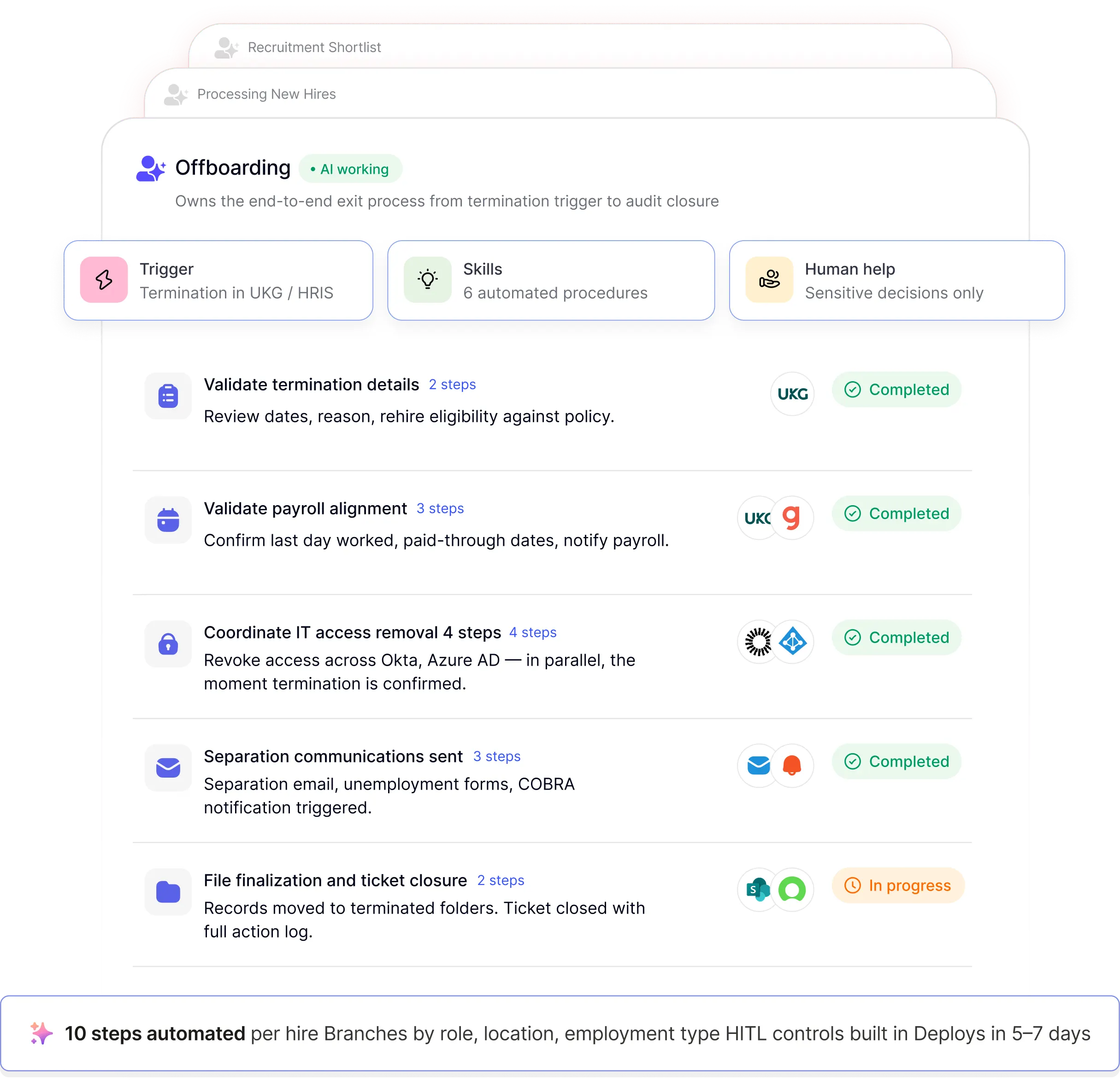
HR teams trust Workativ to automate employee offboarding.

Employee offboarding automation uses AI agents, connected workflows, and system integrations to run the full employee exit process without manual HR coordination. A single termination event a status change in UKG, BambooHR, or any HRIS triggers the automated offboarding process: validation, payroll alignment, IT access coordination, separation communications, compliance documentation, and audit closure. Unlike traditional offboarding checklists, Workativ's HR offboarding automation uses AI Co-Worker agents that handle voluntary and involuntary exits differently, escalate exceptions with full context, and resume automatically after resolution making automated offboarding and employee exit automation genuinely end to end, not just partially tracked.
Every manual offboarding is a security gap waiting to happen.
Three statistics every HR Director and CHRO should know before the next employee departure is handled manually.
83%
Retain access
after leaving
Annual structured HR workflow tickets including offboarding sequences each previously requiring an HR coordinator to track completion across UKG, PeopleHub, SharePoint, and Outlook.
35%
Security incidents
linked to offboarding failures
35% of security incidents in 2026 were linked to improperly offboarded employees. Lack of automated access revocation is consistently identified as the core contributor.
44%
Revoke all access
within 24 hours
Only 44% of companies revoke all system access within 24 hours of an employee's departure. The rest are exposed for days, weeks, or indefinitely because IT coordination is manual.
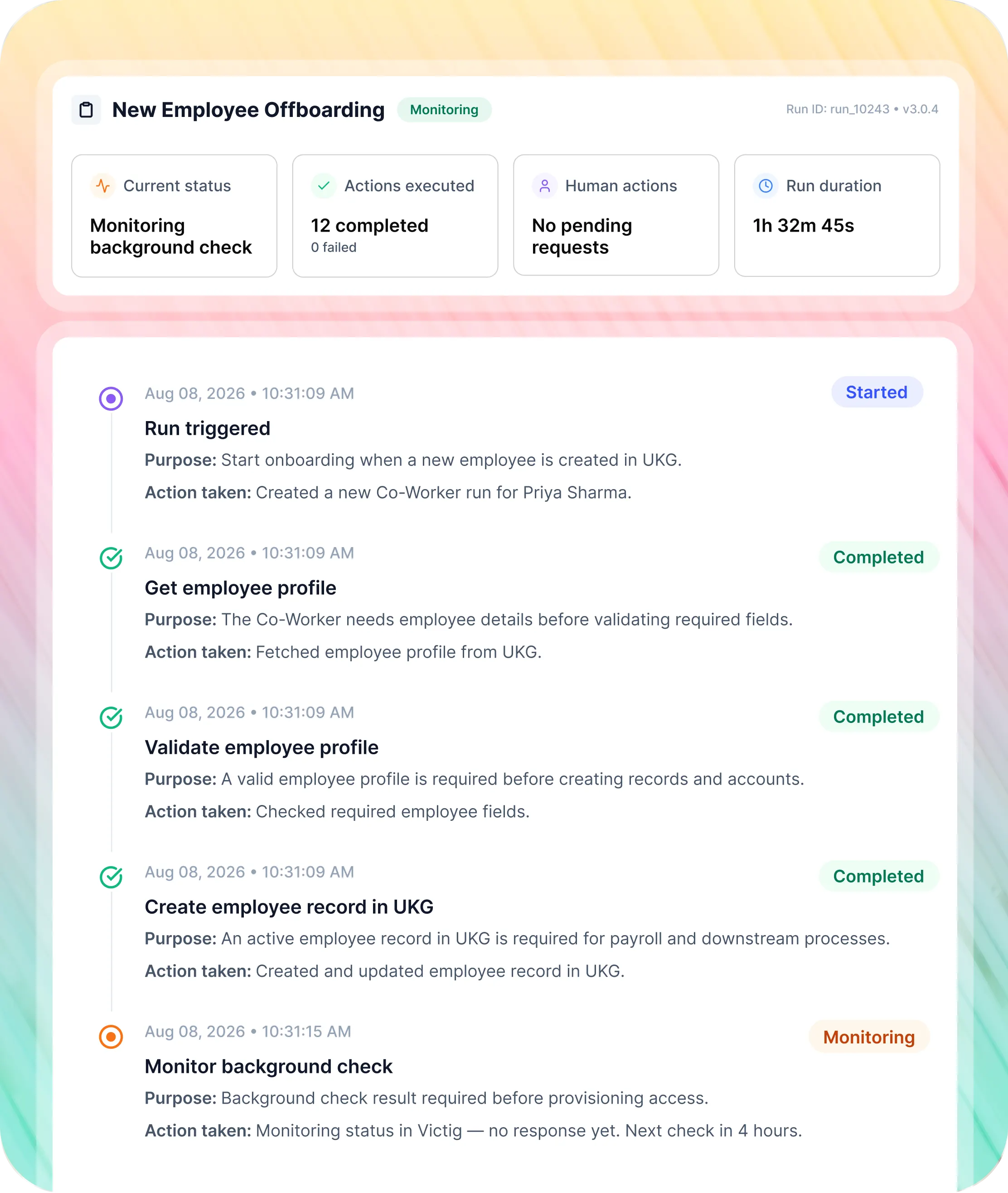
10 manual steps. 7 systems. Coordinated by email. This is what offboarding looks like before Workativ.
The real manual employee offboarding workflow from termination submission to ticket closure with the actual systems HR teams navigate by hand. This is what teams are trying to automate offboarding away from.
Steps | Before Workativ manual |  |
|---|---|---|
Termination review |  |  |
Documentation validation | | |
Compliance forms | | |
Payroll alignment | | |
IT access removal | | |
Payback obligations | | |
10 offboarding steps the AI Co-Worker runs without HR coordinating each one.
Steps marked HITL pause for HR approval before continuing. Every other step executes automatically no HR initiating, chasing, or closing each one..

Termination details validated
Termination dates, reason, and rehire eligibility validated against policy. Discrepancies flagged to HR with specific details before the sequence continues.


Documentation confirmed
Resignation or termination documentation checked in UKG. Missing or incorrect files flagged with specific instructions no HR manually reviewing each upload.


Payroll and dates aligned
Termination date, last day worked, and paid-through dates validated. Payroll notified automatically of any discrepancies or retro impacts. Rehire eligibility updated.


IT access removed always automatic
Access removal confirmed across all connected systems simultaneously Okta, Azure AD, Office 365 regardless of termination timing or type. Never "auto or manual depending on circumstances."


Payback obligations reviewed
Employee file checked for bonus payback agreements and outstanding obligations. Requirements flagged to HR with supporting documentation no manual SharePoint review.


Approval workflow monitored
UKG workflow approvals monitored automatically. Denied or pending HRBP approval steps escalated to the right person with full context no HR manually checking status in UKG.


Separation communications triggered
Separation email and applicable documents generated from PeopleHub templates. State-specific unemployment forms prepared and sent via Postalocity. COBRA notification triggered within the 14-day window.


Specialized obligations handled
Provider notifications sent. Job abandonment letter created where applicable. NDA re-acknowledgement and IP assignment confirmation routed to the departing employee automatically.


Files and I-9 records moved
Employee file and I-9 records moved to terminated folders in SharePoint automatically. Data archived per your retention policy. No manual file management required.


Ticket closed with full audit trail
Offboarding checklist completed. Ticket closed in PeopleHub with full documentation and audit trail every action, approval, and communication timestamped. Compliance-ready from day one.

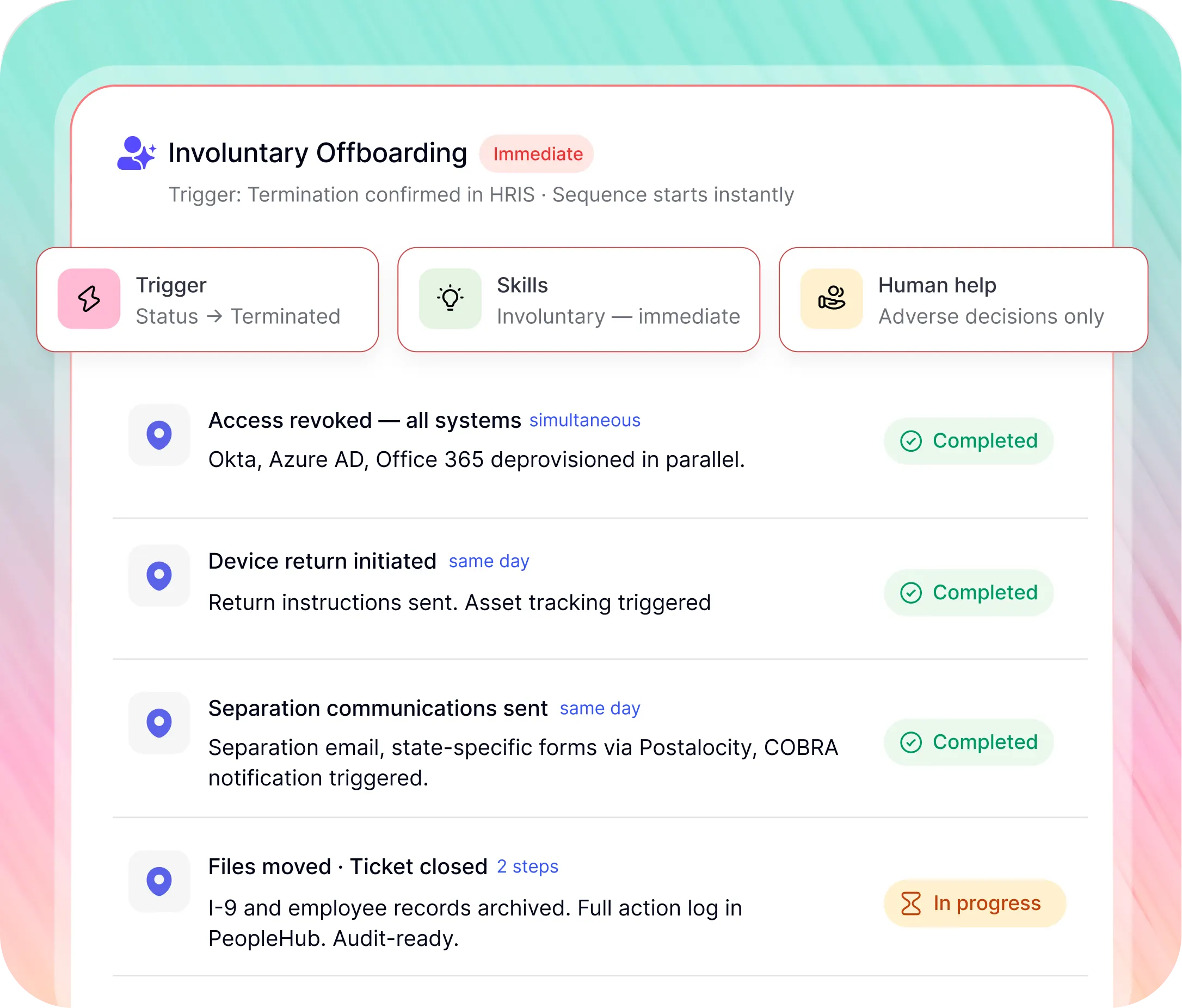
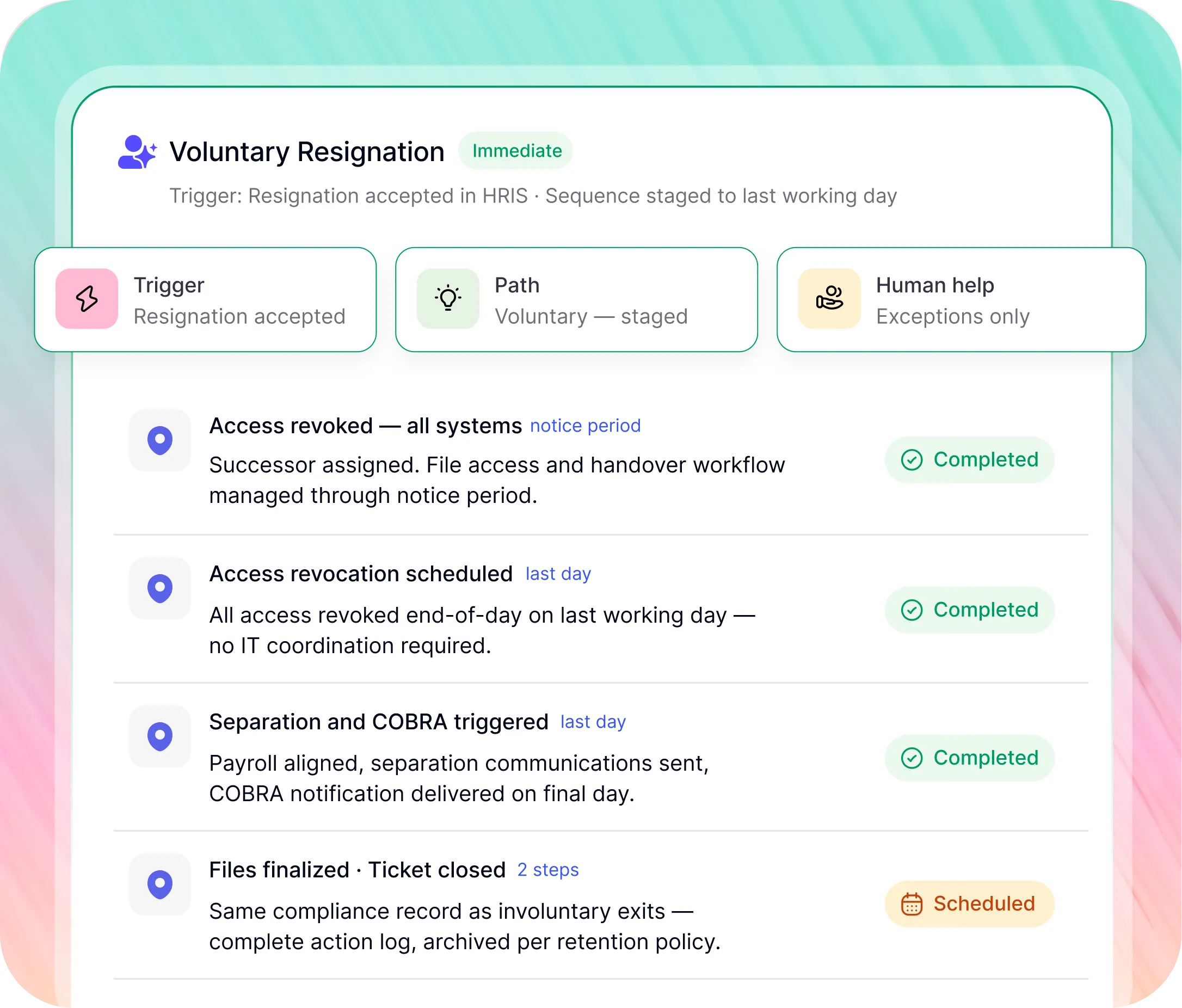
Voluntary and involuntary terminations require different sequences. Workativ handles both.
The AI Co-Worker reads the termination reason from the HRIS record and branches automatically. HR does not configure a separate workflow for each scenario.
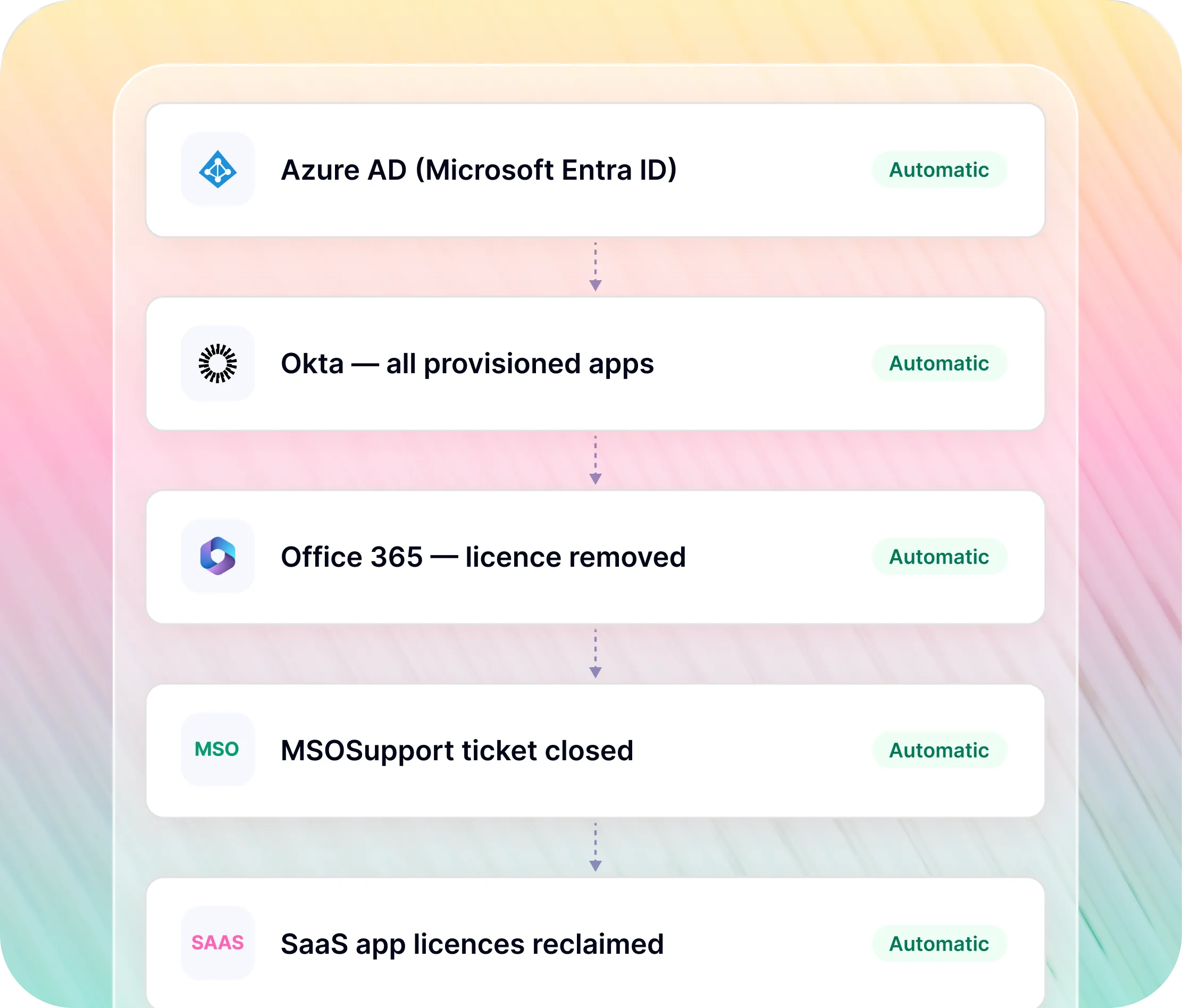
Access revoked the moment termination fires.

Workativ automates employee offboarding access revocation across every connected system the moment termination is confirmed no ticket, no coordination, no gaps
Every revocation is executed in parallel across Okta, Azure AD, Office 365, and all SaaS apps not sequentially, not dependent on who responds first
Every system logs a timestamped confirmation so the employee offboarding workflow has a complete access revocation record without HR manually tracking each one
Every offboarding action logged in real time.
Access revocation confirmed per system
Every connected system logs a revocation confirmation Okta deprovisioned, Azure AD disabled, Office 365 licence removed timestamped to the second.
Compliance evidence without extra work
Every COBRA notification, every state-specific form sent, every approval logged automatically. HR can generate a complete departure record for any employee at any time.
No manual status checking
HR sees the status of every offboarding in one view completed, in progress, blocked without chasing IT for access confirmation or Payroll for alignment status.
Offboarding has legal deadlines. Workativ meets them automatically.
Named obligations. Specific timelines. Automated delivery including access revocation automation, COBRA notification, and state-specific final pay not a checklist HR has to remember per departure.

COBRA notification
COBRA notification triggered automatically as part of the separation communications step generated from your templates, delivered within the legally mandated 14-day window from the qualifying event.

State-specific final pay laws
Workativ reads the employee's work state from the HRIS record and applies the correct final pay timeline automatically same day in California, 72 hours in Colorado, next scheduled payday in most other states.

GDPR data deletion and archival
Employee data archived or deleted per your defined retention policy at the point of file finalization. PII redacted from logs where required. Documentation of what data exists, where it is stored, and when it will be deleted available at any time.

NDA, IP, and legal hold
NDA re-acknowledgement and IP assignment confirmation routed to the departing employee automatically. Litigation hold check triggered where applicable. Every document delivery timestamped not remembered by the HR coordinator who handled the exit.
What GoTo recovered when Workativ automated their employee offboarding.
GoTo's HR workflow analysis included structured offboarding and onboarding sequences. Each required an HR coordinator to chase emails, toggle between systems, and manually track completion.
1,748
Workflow tickets
automated annually
Annual structured HR workflow tickets including offboarding sequences each previously requiring an HR coordinator to track completion across UKG, PeopleHub, SharePoint, and Outlook.
10,488 hrs
Annual handling
hours returned
Six hours of coordination per workflow ticket chasing IT access confirmation, preparing state-specific forms, monitoring approval status returned to HR capacity.
10 steps
Steps automated
per departure
Approximately 10 offboarding steps automated per departure across 7 connected systems from termination trigger to audit closure, without HR initiating a single one.
Every system in your exit process connected.
100+ pre-built integrations. Bidirectional read and write the AI Co-Worker executes real actions in your systems, not lookups.


'/%3e%3cpath%20d='M7.53747%209.7499L4.18595%209.72912C3.89511%209.72912%203.66314%209.49022%203.66314%209.20285C3.66314%209.08859%203.70122%208.98126%203.76701%208.89124L8.69389%202.30244C10.2589%203.46925%2010.5809%205.68513%209.41059%207.2501L7.53747%209.7499Z'%20fill='url(%23paint1_linear_217_318)'/%3e%3cdefs%3e%3clinearGradient%20id='paint0_linear_217_318'%20x1='7.3717'%20y1='1.41211'%20x2='9.07645'%20y2='11.0799'%20gradientUnits='userSpaceOnUse'%3e%3cstop%20stop-color='%239DC9FC'/%3e%3cstop%20offset='0.6866'%20stop-color='white'/%3e%3c/linearGradient%3e%3clinearGradient%20id='paint1_linear_217_318'%20x1='9.68512'%20y1='1.62241'%20x2='6.91576'%20y2='7.45173'%20gradientUnits='userSpaceOnUse'%3e%3cstop%20stop-color='%239DC9FC'/%3e%3cstop%20offset='0.7152'%20stop-color='white'/%3e%3c/linearGradient%3e%3c/defs%3e%3c/svg%3e)


%20--%3e%3csvg%20version='1.1'%20id='Layer_1'%20xmlns='http://www.w3.org/2000/svg'%20xmlns:xlink='http://www.w3.org/1999/xlink'%20x='0px'%20y='0px'%20viewBox='0%200%20512%20512'%20style='enable-background:new%200%200%20512%20512;'%20xml:space='preserve'%3e%3cstyle%20type='text/css'%3e%20.st0{fill:%23F7F7F7;}%20.st1{fill:%2328E4C3;}%20.st2{fill:url(%23SVGID_1_);}%20.st3{fill:url(%23SVGID_2_);}%20%3c/style%3e%3ccircle%20class='st0'%20cx='256'%20cy='256'%20r='245.5'/%3e%3cg%3e%3cg%3e%3cpath%20class='st1'%20d='M304.7,405.6'/%3e%3c/g%3e%3c/g%3e%3cg%3e%3cg%3e%3cpath%20class='st1'%20d='M305.8,353'/%3e%3c/g%3e%3c/g%3e%3clinearGradient%20id='SVGID_1_'%20gradientUnits='userSpaceOnUse'%20x1='388.1461'%20y1='99.0534'%20x2='204.4846'%20y2='204.5899'%20gradientTransform='matrix(1%200%200%20-1%200%20514)'%3e%3cstop%20offset='0.18'%20style='stop-color:%230052CC'/%3e%3cstop%20offset='1'%20style='stop-color:%232684FF'/%3e%3c/linearGradient%3e%3cpath%20class='st2'%20d='M119.9,330.3c-3,4.9-6.4,10.7-9.3,15.3c-2.6,4.4-1.2,10,3.1,12.7l60.7,37.4c4.4,2.7,10.1,1.3,12.9-3%20c0,0,0.1-0.1,0.1-0.1c2.4-4.1,5.6-9.3,9-15c24-39.7,48.2-34.8,91.9-14l60.2,28.6c4.7,2.2,10.2,0.2,12.4-4.4c0-0.1,0.1-0.2,0.1-0.3%20l28.9-65.4c2-4.7,0-10.1-4.7-12.2c-12.7-6-38-17.9-60.7-28.9C242.6,241.2,173.1,243.7,119.9,330.3z'/%3e%3clinearGradient%20id='SVGID_2_'%20gradientUnits='userSpaceOnUse'%20x1='613.0198'%20y1='1773.9866'%20x2='429.3116'%20y2='1879.5697'%20gradientTransform='matrix(-1%200%200%201%20736.83%20-1676.71)'%3e%3cstop%20offset='0.18'%20style='stop-color:%230052CC'/%3e%3cstop%20offset='1'%20style='stop-color:%232684FF'/%3e%3c/linearGradient%3e%3cpath%20class='st3'%20d='M392.1,181.9c3-4.9,6.4-10.7,9.3-15.3c2.6-4.4,1.2-10-3.1-12.7l-60.7-37.4c-4.3-2.9-10.1-1.7-13,2.5%20c-0.1,0.2-0.2,0.4-0.3,0.6c-2.4,4.1-5.6,9.3-9,15c-24,39.7-48.2,34.8-91.9,14l-60-28.5c-4.7-2.2-10.2-0.2-12.4,4.4%20c0,0.1-0.1,0.2-0.1,0.3L122,190.2c-2,4.7,0,10.1,4.7,12.2c12.7,6,38,17.9,60.7,28.9C269.4,271,338.9,268.4,392.1,181.9z'/%3e%3c/svg%3e)


%20--%3e%3csvg%20version='1.1'%20id='Layer_1'%20xmlns='http://www.w3.org/2000/svg'%20xmlns:xlink='http://www.w3.org/1999/xlink'%20x='0px'%20y='0px'%20viewBox='0%200%20512%20512'%20style='enable-background:new%200%200%20512%20512;'%20xml:space='preserve'%3e%3cstyle%20type='text/css'%3e%20.st0{fill:%23EB3C00;}%20.st1{fill:%23FFFFFF;}%20%3c/style%3e%3ccircle%20class='st0'%20cx='256'%20cy='256'%20r='245.5'/%3e%3cpath%20class='st1'%20d='M152.2,332.7v-152L286.7,131l73.1,23.4V359l-73.1,22L152.2,332.7l134.4,16.2V171.9L199,192.4v119.8L152.2,332.7%20z'/%3e%3c/svg%3e)

'%3e%3cpath%20d='M1.86774%200H2.41284C2.55325%200.0357914%202.8438%200.0814543%202.96023%200.144319C3.57556%200.476574%204.24389%200.994086%204.78094%201.44029C4.90785%201.49857%205.14031%201.69076%205.26616%201.78501L6.30254%202.56565L9.23874%204.76784L9.98605%205.32579C10.1165%205.42327%2010.3896%205.61784%2010.4874%205.73305C10.5933%205.62723%2010.7819%205.49083%2010.9035%205.39513C11.2293%205.13895%2011.5711%204.89897%2011.9015%204.64888L14.841%202.43616C15.2641%202.11793%2015.808%201.74101%2016.2059%201.4114C16.7548%201.01773%2017.2984%200.503308%2017.8952%200.193124C18.0888%200.0925009%2018.3311%200.0707975%2018.4996%200.00453492L18.511%200H19.1089C19.2716%200.0419345%2019.4446%200.0664859%2019.6017%200.126337C20.3949%200.428494%2020.8251%201.03647%2020.9795%201.84719V4.05546L17.6977%206.51872L16.7256%207.24655C16.6175%207.32813%2016.3229%207.56223%2016.2176%207.62326L16.2116%207.64067C16.0556%207.74125%2015.7554%207.98423%2015.5914%208.10717L14.2347%209.12565C12.9949%2010.0567%2011.7226%2010.9908%2010.4942%2011.9326C10.3311%2011.8196%2010.1521%2011.6753%209.99028%2011.5543L8.91562%2010.7499L6.14505%208.67116C5.6887%208.32244%205.22946%207.97753%204.76737%207.63644L4.76105%207.62385C4.64747%207.54843%204.4662%207.40207%204.35254%207.31617L3.58531%206.74057L0.993507%204.79937C0.666643%204.55579%200.329975%204.28777%200%204.0539V1.89895C0.0211067%201.8406%200.034732%201.7287%200.0477586%201.66355C0.195443%200.924862%200.778193%200.297181%201.50398%200.095359C1.61897%200.0633797%201.74239%200.0411929%201.85419%200.00451034L1.86774%200Z'%20fill='%23EB4337'/%3e%3cpath%20d='M18.5112%200H19.109C19.2718%200.0419345%2019.4448%200.0664859%2019.6018%200.126337C20.395%200.428494%2020.8252%201.03647%2020.9797%201.8472V4.05546L17.6978%206.51872L16.7258%207.24655C16.6176%207.32813%2016.3231%207.56223%2016.2177%207.62326C16.2065%207.10816%2016.2151%206.56484%2016.215%206.04638L16.2148%203.13227L16.2154%201.98927C16.2154%201.85241%2016.2236%201.52684%2016.2061%201.4114C16.755%201.01773%2017.2986%200.503308%2017.8953%200.193124C18.089%200.0925009%2018.3312%200.0707975%2018.4998%200.00453492L18.5112%200Z'%20fill='%23FCBC03'/%3e%3cpath%20d='M1.86774%200H2.41284C2.55325%200.0357914%202.8438%200.0814543%202.96023%200.144319C3.57556%200.476574%204.24389%200.994086%204.78094%201.44029C4.75802%201.55136%204.76536%201.81314%204.76577%201.93571L4.7683%202.76769L4.76727%206.06197L4.76854%207.06889C4.76879%207.22294%204.77708%207.48131%204.76105%207.62385C4.64746%207.54843%204.4662%207.40207%204.35254%207.31617L3.58531%206.74057L0.993506%204.79937C0.666643%204.5558%200.329975%204.28777%200%204.0539V1.89895C0.0211067%201.8406%200.034732%201.7287%200.0477586%201.66355C0.195443%200.924862%200.778193%200.297181%201.50398%200.095359C1.61897%200.0633798%201.74239%200.0411929%201.85419%200.00451034L1.86774%200Z'%20fill='%23C62220'/%3e%3cpath%20d='M0%204.05371C0.329975%204.28758%200.666643%204.5556%200.993507%204.79918L3.58531%206.74038L4.35254%207.31598C4.4662%207.40188%204.64747%207.54824%204.76105%207.62365L4.76737%207.63625C4.79294%207.81891%204.78411%208.19988%204.78406%208.39833L4.78312%209.71796L4.78339%2014.2476C4.7834%2014.4489%204.8101%2015.6601%204.76016%2015.7263C4.75851%2015.7284%204.75656%2015.7304%204.75498%2015.7326C4.75244%2015.7361%204.75024%2015.74%204.74778%2015.7435C4.7463%2015.7457%204.74469%2015.7477%204.74315%2015.7498H1.23433C1.02953%2015.6658%200.870008%2015.6564%200.656526%2015.5145C0.258114%2015.2497%200.102217%2014.9456%200%2014.4978V4.05371Z'%20fill='%234185F5'/%3e%3cpath%20d='M20.9794%204.05566V14.5025C20.828%2015.1172%2020.5387%2015.5356%2019.8875%2015.6981C19.8377%2015.7104%2019.7443%2015.7302%2019.7008%2015.7502H16.235C16.1758%2015.6436%2016.1987%2013.9178%2016.1987%2013.683L16.199%2010.2145L16.1984%208.51668C16.1982%208.31838%2016.1872%207.81396%2016.2115%207.64088L16.2175%207.62347C16.3228%207.56244%2016.6174%207.32834%2016.7255%207.24676L17.6976%206.51892L20.9794%204.05566Z'%20fill='%2333A953'/%3e%3c/g%3e%3cdefs%3e%3cclipPath%20id='clip0_1380_1288'%3e%3crect%20width='20.9795'%20height='15.75'%20fill='white'/%3e%3c/clipPath%3e%3c/defs%3e%3c/svg%3e)
%20--%3e%3csvg%20version='1.1'%20id='Layer_1'%20xmlns='http://www.w3.org/2000/svg'%20xmlns:xlink='http://www.w3.org/1999/xlink'%20x='0px'%20y='0px'%20viewBox='0%200%20512%20512'%20style='enable-background:new%200%200%20512%20512;'%20xml:space='preserve'%3e%3cstyle%20type='text/css'%3e%20.st0{fill:%230062FF;}%20.st1{fill:%23FFFFFF;}%20%3c/style%3e%3ccircle%20class='st0'%20cx='256'%20cy='256'%20r='245.5'/%3e%3cpath%20class='st1'%20d='M256,162.5l-91,58.2l91,58.2l-91,58.2l-91-59.1l91-58.2l-91-57.3l91-58.2L256,162.5z%20M164.1,355.5l91-58.2%20l91,58.2l-91,58.2L164.1,355.5z%20M256,278.1l91-58.2l-91-57.3l91-58.2l91,58.2l-91,58.2l91,58.2l-91,58.2L256,278.1z'/%3e%3c/svg%3e)


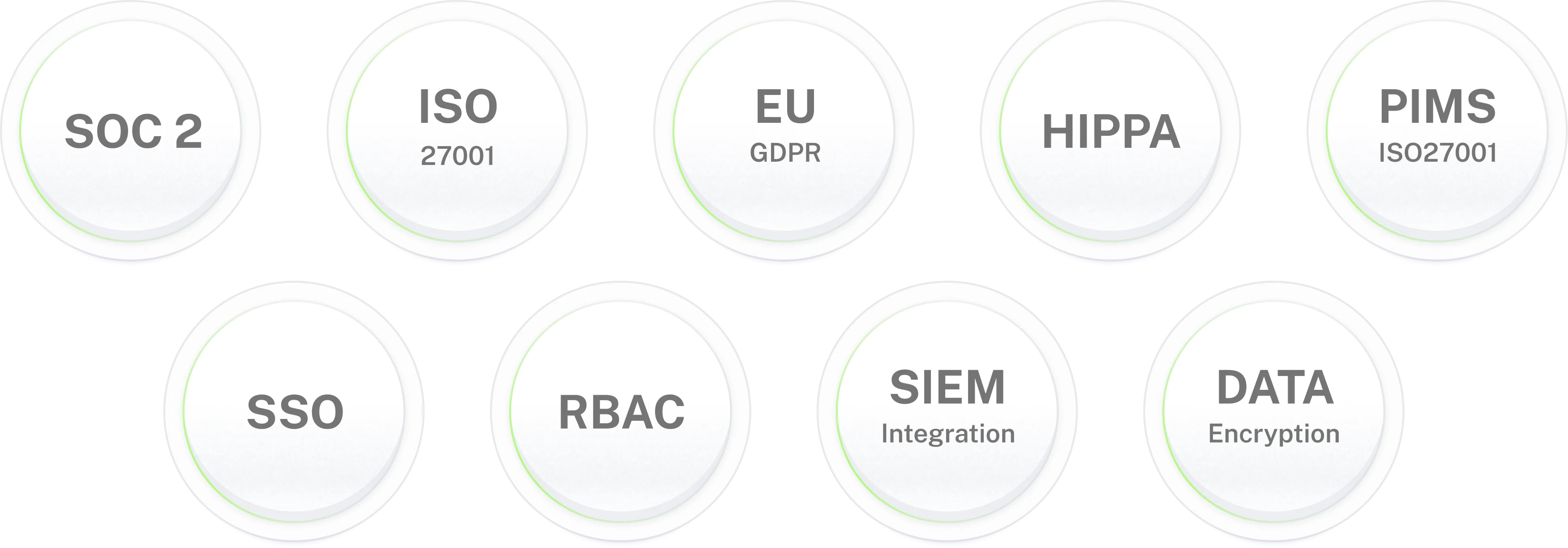
Employee offboarding handles your most sensitive data. Workativ is built for that responsibility.
Ready to automate employee
offboarding from trigger to closure?
Deploy Workativ's AI Co-Worker for offboarding in 5 to 7 days connected to your HRIS, identity stack, and communication channels.
Frequently asked questions
Questions CHROs, HR Directors, and People Operations leaders ask about employee offboarding automation.
What is employee offboarding automation?
Employee offboarding automation uses AI agents, connected workflows, and system integrations to coordinate employee exit processes without manual HR intervention. A single termination event in the HRIS triggers the full exit sequence: termination validation, payroll alignment, IT access coordination, separation communications, compliance documentation, and audit closure. Workativ's offboarding automation uses AI Co-Worker agents that handle voluntary and involuntary exits differently, escalate exceptions with full context, and resume automatically after resolution.
What is the difference between voluntary and involuntary offboarding automation?
Voluntary terminations allow a notice period access revocation is scheduled for the last working day, with payroll, communications, and file management coordinated through the notice period. Involuntary terminations require immediate action Workativ's AI Co-Worker triggers simultaneous access revocation across all systems the moment the termination is confirmed, without waiting for a manual IT coordination step. Workativ handles both paths from the same HRIS trigger, branching automatically based on termination type.
What does employee offboarding automation handle automatically?
Termination validation, documentation review, payroll alignment, IT access coordination across Okta and Azure AD, payback obligation review, approval monitoring, separation communications, state-specific unemployment form preparation, COBRA notification, provider notifications, NDA and IP documentation, file and I-9 record finalization, and ticket closure with full audit trail approximately 10 steps across 7 connected systems per departure.
How does Workativ automate access revocation during offboarding?
Workativ's AI Co-Worker coordinates access removal across all connected systems simultaneously Okta, Azure AD, Office 365, SaaS applications the moment a termination is confirmed. Unlike manual IT coordination where access removal depends on timing and who responds to the IT ticket, Workativ's access revocation is always automatic, always simultaneous, and always logged with a timestamped record per system.
How does Workativ handle COBRA notification compliance?
Workativ's AI Co-Worker triggers COBRA notification automatically as part of the separation communications step. The notification is generated from your templates and delivered within the legally mandated 14-day window from the qualifying event. The delivery is timestamped for compliance documentation no HR manually tracking the 14-day clock per departing employee.
What compliance obligations does Workativ's offboarding automation address?
COBRA notification within 14 days, state-specific final pay laws (same day in California, 72 hours in Colorado, next scheduled payday in most other states), GDPR data deletion or archival per your retention policy, NDA re-acknowledgement and IP assignment confirmation, I-9 record retention requirements, and SOC 2 and HIPAA-compliant audit trail documentation for every action taken during the offboarding sequence.
What happens when an offboarding step fails or an exception occurs?
Workativ's AI Co-Worker escalates exceptions to the right HR person with full context which steps have completed, what blocked the workflow, and what decision is required. Dependent steps pause until the exception is resolved. The workflow resumes automatically after resolution without HR restarting from the beginning.
How does Workativ handle state-specific offboarding compliance?
Workativ's AI Co-Worker reads the employee's work state from the HRIS record and applies the correct compliance requirements automatically final pay timing, state-specific unemployment form preparation, and any state-mandated notification requirements. HR does not manually look up which rules apply per state for each departure.
Does employee offboarding automation replace HR staff?
No. Workativ eliminates repetitive coordination manually tracking approval status in UKG, chasing IT for access confirmation, preparing unemployment forms state by state, re-entering data across PeopleHub, SharePoint, and Outlook for every departure. HR retains control over adverse decisions, severance exceptions, sensitive termination conversations, and all steps requiring human judgment.
Which HRIS systems does Workativ connect to for offboarding?
UKG, BambooHR, Workday, ADP, Rippling, HiBob, Personio, SAP SuccessFactors, and Oracle HCM as offboarding triggers. Plus Okta, Azure AD, Office 365, ServiceNow, Jira Service Management, Freshservice, SharePoint, Slack, Teams, and 100+ other systems for offboarding execution.
How quickly can employee offboarding automation be deployed?
Workativ's offboarding automation deploys in 5 to 7 days. Pre-built connectors for UKG, BambooHR, Workday, Okta, Azure AD, and ServiceNow require no custom integration work. Pre-built offboarding AI Co-Worker templates are configurable without developer involvement.
Is Workativ's offboarding automation secure for sensitive employee data?
Yes. Workativ is SOC 2 Type II, ISO 27001, GDPR, and HIPAA compliant. Every automated action in the offboarding sequence is logged to an immutable audit trail every access revocation, every document sent, every approval, every file moved timestamped and exportable. PII data redacted from logs where required.