


Leave requests handled in Slack. HR handles nothing manually.
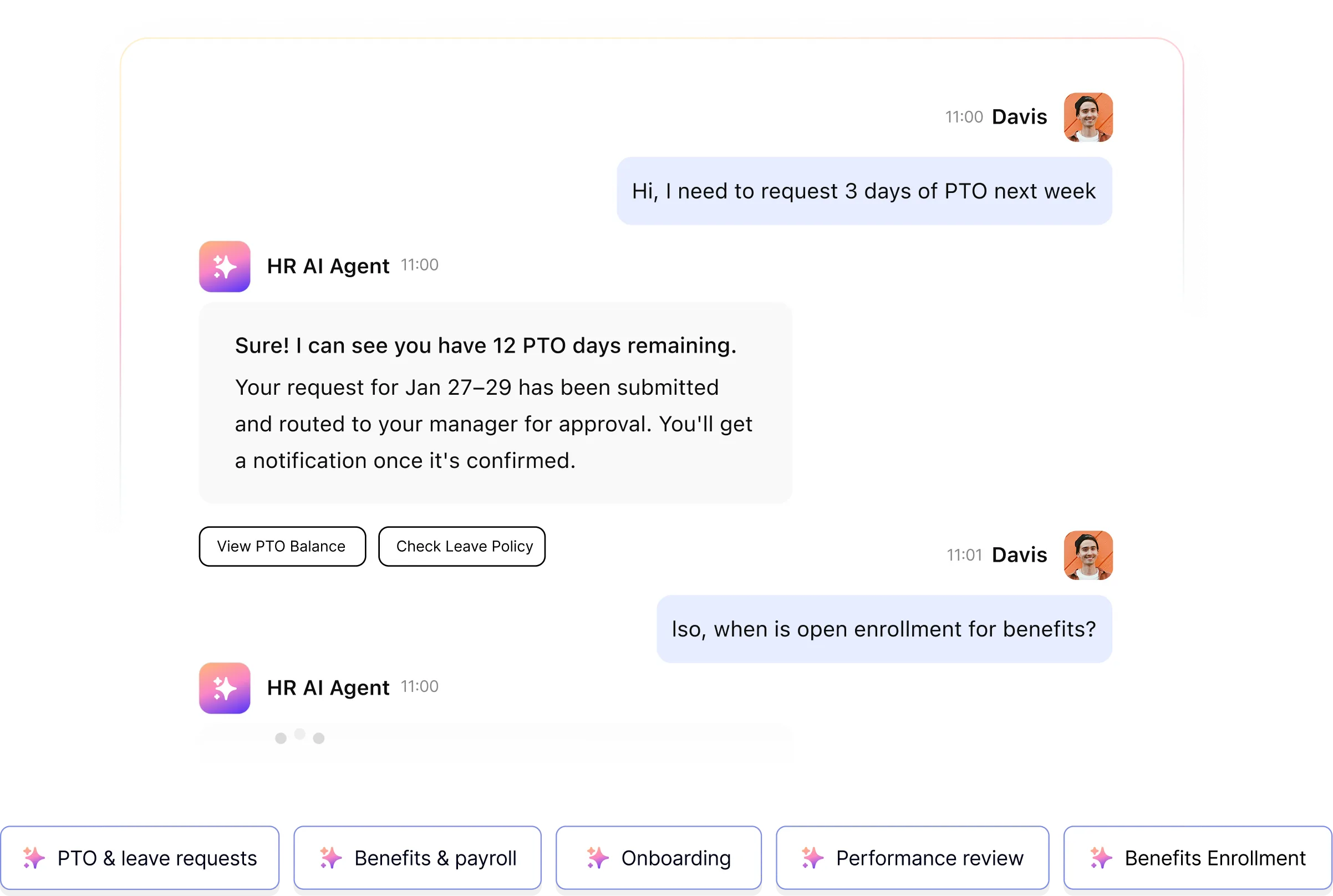
Employee asks for PTO in Slack. Workativ's AI agent checks the balance in Workday, routes it to the manager for one-tap approval, updates the leave record, and confirms. HR sees the dashboard.
HR Teams of all sizes trusts Workativ AI to automate HR Operations & Support

What HR does manually every appraisal cycle and what the AI agent does instead.
Leave requests fail the same way every time. Every step below is where it goes wrong.
Before — manual leave management
Leave request
Employee emails HR or their manager. No standard format. Half reach the wrong person.
Balance check
HR logs into the HRIS to check the balance. This happens 20 times a week. Each check: 4 minutes.
Manager approval
HR emails the manager. Reply comes two days later or not at all. Employee waits with no status.
HRIS update
Someone updates the HRIS. Or they forget. Balances drift. Payroll discrepancies follow.
Employee confirmation
Employee emails HR to check. HR replies. No shared record. Same conversation next quarter.

Slack or Teams request
Employee sends a natural message in Slack: "I need 3 days off next week." AI agent receives and classifies the request automatically.
Real-time HRIS balance
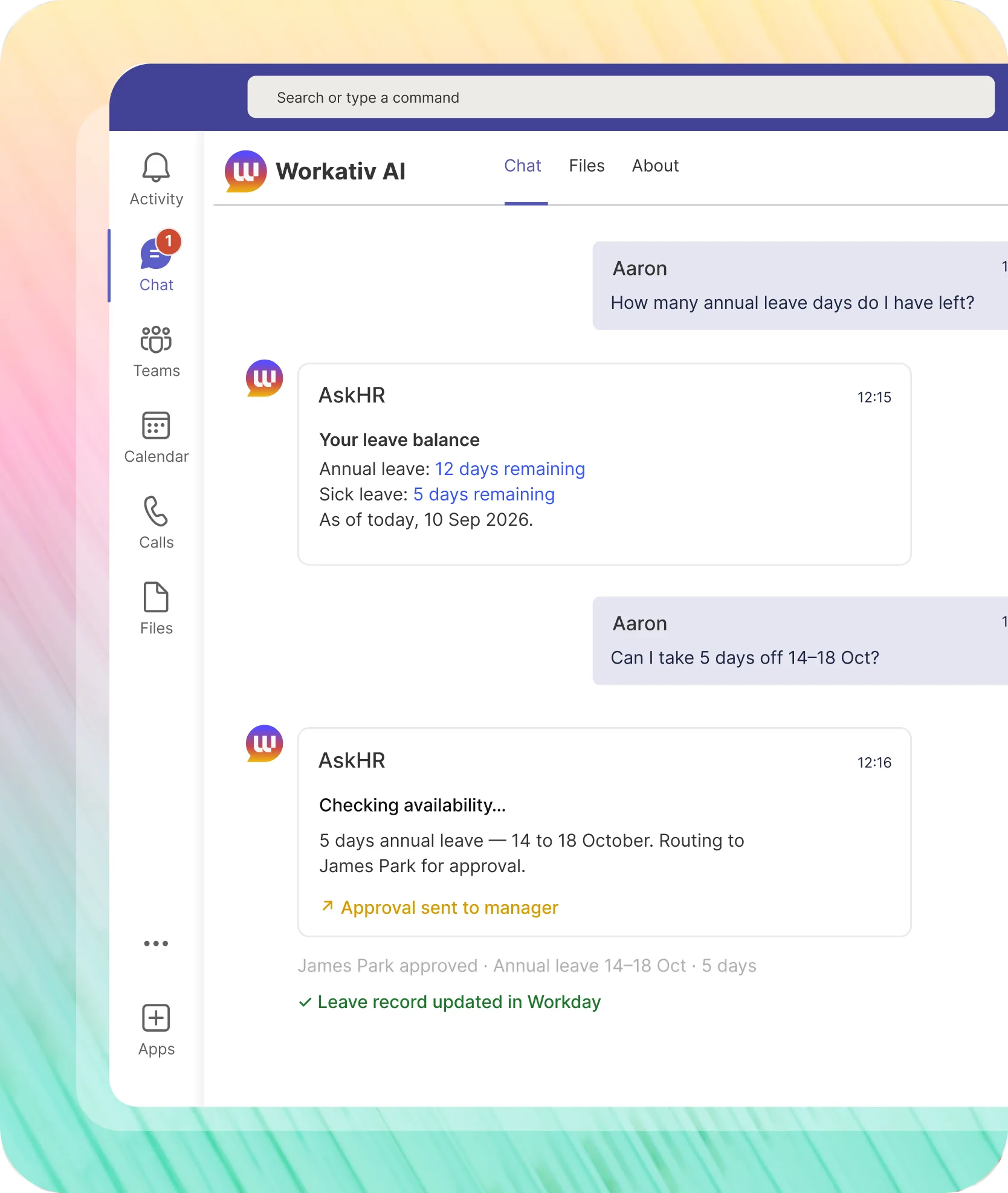
AI agent reads the employee's leave balance from Workday, BambooHR, or UKG via API. Accurate and real-time. HR never opens the HRIS for this.
One-tap Slack approval
Manager receives the leave request in Slack dates, leave type, remaining balance. Approves or rejects with one tap. No email, no portal login.
Automatic HRIS record
On approval, AI agent creates the leave record in the HRIS immediately. Balance updates in real time. No manual entry. No Friday corrections.
Confirmed in the same thread
Employee receives approval confirmation in their original Slack message. Leave dates, days remaining, manager who approved. One record. No follow-up email.
Four steps. HR coordinates none of them for a standard leave request.
Standard requests complete without HR. Exceptions route to HR with full context already attached.

Employee submits a leave request in Slack or Microsoft Teams. No form required.
Natural language: "I need annual leave 14–18 Oct." The AI agent reads the request and checks the employee's real-time balance and policy entitlement in the HRIS before doing anything else.


The HRIS has the answer in seconds. So does the employee.
Workativ reads the leave balance from Workday, BambooHR, UKG, ADP, or SAP SuccessFactors via API. Sufficient entitlement: request created and routed. Not enough: employee told immediately, in the same thread, with their accurate balance.


Manager sees who's asking, for what dates, with days remaining. One tap.
The notification arrives in Slack or Teams with everything the manager needs: employee name, dates, leave type, days remaining after approval. Approve or reject one tap. HRIS record updates immediately on approval.

The employee gets an answer. HR does nothing.
Approved: the employee sees confirmed dates and updated balance in their original Slack thread. HRIS already updated. Rejected: reason and options same thread. HR sees everything in the dashboard. No manual entry either way.

The questions that shouldn't reach HR answered in Slack.
The most frequent HR interaction for leave is the question before the request. Workativ handles both.

Employees know their balance before they ask HR.
"How many days do I have left?" Workativ reads the live balance from Workday, BambooHR, or UKG and replies in seconds.
Policy questions answered before they become email threads.
Carryover rules, parental entitlement, blackout periods answered from your HR knowledge base in the same Slack thread. No ticket, no wait.
UK employee gets UK rules. US employee gets PTO balance.
The AI agent applies the correct policy per employee based on their country and entity in the HRIS. HR configures it once.
3am in Singapore. No HR on call. Still answered.
Time zone differences don't create leave query backlogs. Workativ answers from the HRIS and knowledge base immediately, any hour.
How GoTo automated HR and IT support for 5,000 employees in Slack including leave management.
GoTo deployed Workativ for 5,000 employees in Slack HR and IT support in one AI agent. Leave requests, balance checks, and policy queries included.
"For us, the real value of Workativ is moving beyond AI-powered answers to AI-powered execution. Routine IT requests can now be resolved through self-service in Slack, with Workativ taking action across the systems behind the request. It reduces the operational load on IT while giving employees a much faster and more consistent support experience."

Juan Ortiz
Senior IT Engineer

Whichever HRIS your HR team uses Workativ reads balances and writes leave records directly.
Employee leave management automation connects to your existing HRIS stack. Pre-built connectors, no custom integration work. Leave data stays in your HRIS Workativ handles the employee-facing conversation.


%20--%3e%3csvg%20version='1.1'%20id='Layer_1'%20xmlns='http://www.w3.org/2000/svg'%20xmlns:xlink='http://www.w3.org/1999/xlink'%20x='0px'%20y='0px'%20viewBox='0%200%20512%20512'%20style='enable-background:new%200%200%20512%20512;'%20xml:space='preserve'%3e%3cstyle%20type='text/css'%3e%20.st0{fill:%23F7F7F7;}%20.st1{fill:%2328E4C3;}%20.st2{fill:url(%23SVGID_1_);}%20.st3{fill:url(%23SVGID_2_);}%20%3c/style%3e%3ccircle%20class='st0'%20cx='256'%20cy='256'%20r='245.5'/%3e%3cg%3e%3cg%3e%3cpath%20class='st1'%20d='M304.7,405.6'/%3e%3c/g%3e%3c/g%3e%3cg%3e%3cg%3e%3cpath%20class='st1'%20d='M305.8,353'/%3e%3c/g%3e%3c/g%3e%3clinearGradient%20id='SVGID_1_'%20gradientUnits='userSpaceOnUse'%20x1='388.1461'%20y1='99.0534'%20x2='204.4846'%20y2='204.5899'%20gradientTransform='matrix(1%200%200%20-1%200%20514)'%3e%3cstop%20offset='0.18'%20style='stop-color:%230052CC'/%3e%3cstop%20offset='1'%20style='stop-color:%232684FF'/%3e%3c/linearGradient%3e%3cpath%20class='st2'%20d='M119.9,330.3c-3,4.9-6.4,10.7-9.3,15.3c-2.6,4.4-1.2,10,3.1,12.7l60.7,37.4c4.4,2.7,10.1,1.3,12.9-3%20c0,0,0.1-0.1,0.1-0.1c2.4-4.1,5.6-9.3,9-15c24-39.7,48.2-34.8,91.9-14l60.2,28.6c4.7,2.2,10.2,0.2,12.4-4.4c0-0.1,0.1-0.2,0.1-0.3%20l28.9-65.4c2-4.7,0-10.1-4.7-12.2c-12.7-6-38-17.9-60.7-28.9C242.6,241.2,173.1,243.7,119.9,330.3z'/%3e%3clinearGradient%20id='SVGID_2_'%20gradientUnits='userSpaceOnUse'%20x1='613.0198'%20y1='1773.9866'%20x2='429.3116'%20y2='1879.5697'%20gradientTransform='matrix(-1%200%200%201%20736.83%20-1676.71)'%3e%3cstop%20offset='0.18'%20style='stop-color:%230052CC'/%3e%3cstop%20offset='1'%20style='stop-color:%232684FF'/%3e%3c/linearGradient%3e%3cpath%20class='st3'%20d='M392.1,181.9c3-4.9,6.4-10.7,9.3-15.3c2.6-4.4,1.2-10-3.1-12.7l-60.7-37.4c-4.3-2.9-10.1-1.7-13,2.5%20c-0.1,0.2-0.2,0.4-0.3,0.6c-2.4,4.1-5.6,9.3-9,15c-24,39.7-48.2,34.8-91.9,14l-60-28.5c-4.7-2.2-10.2-0.2-12.4,4.4%20c0,0.1-0.1,0.2-0.1,0.3L122,190.2c-2,4.7,0,10.1,4.7,12.2c12.7,6,38,17.9,60.7,28.9C269.4,271,338.9,268.4,392.1,181.9z'/%3e%3c/svg%3e)


%20--%3e%3csvg%20version='1.1'%20id='Layer_1'%20xmlns='http://www.w3.org/2000/svg'%20xmlns:xlink='http://www.w3.org/1999/xlink'%20x='0px'%20y='0px'%20viewBox='0%200%20512%20512'%20style='enable-background:new%200%200%20512%20512;'%20xml:space='preserve'%3e%3cstyle%20type='text/css'%3e%20.st0{fill:%23EB3C00;}%20.st1{fill:%23FFFFFF;}%20%3c/style%3e%3ccircle%20class='st0'%20cx='256'%20cy='256'%20r='245.5'/%3e%3cpath%20class='st1'%20d='M152.2,332.7v-152L286.7,131l73.1,23.4V359l-73.1,22L152.2,332.7l134.4,16.2V171.9L199,192.4v119.8L152.2,332.7%20z'/%3e%3c/svg%3e)


%20--%3e%3csvg%20version='1.1'%20id='Layer_1'%20xmlns='http://www.w3.org/2000/svg'%20xmlns:xlink='http://www.w3.org/1999/xlink'%20x='0px'%20y='0px'%20viewBox='0%200%20512%20512'%20style='enable-background:new%200%200%20512%20512;'%20xml:space='preserve'%3e%3cstyle%20type='text/css'%3e%20.st0{fill:%230062FF;}%20.st1{fill:%23FFFFFF;}%20%3c/style%3e%3ccircle%20class='st0'%20cx='256'%20cy='256'%20r='245.5'/%3e%3cpath%20class='st1'%20d='M256,162.5l-91,58.2l91,58.2l-91,58.2l-91-59.1l91-58.2l-91-57.3l91-58.2L256,162.5z%20M164.1,355.5l91-58.2%20l91,58.2l-91,58.2L164.1,355.5z%20M256,278.1l91-58.2l-91-57.3l91-58.2l91,58.2l-91,58.2l91,58.2l-91,58.2L256,278.1z'/%3e%3c/svg%3e)


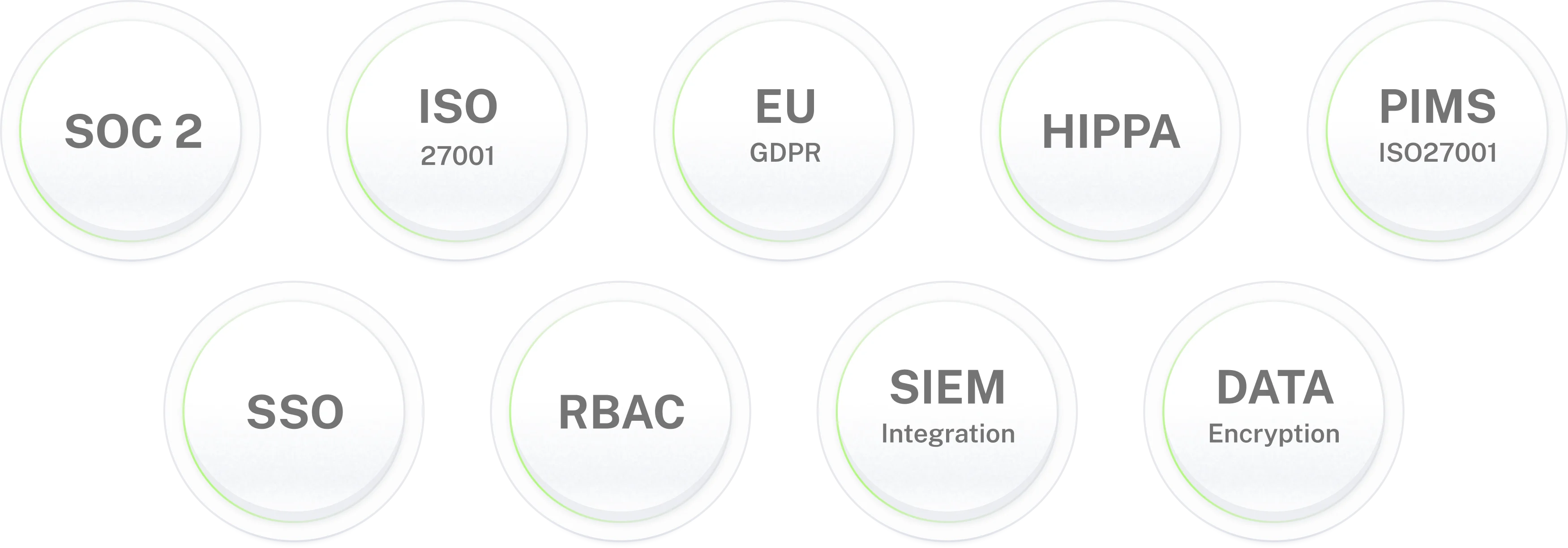
Automate leave requests and HR leave approval automation with enterprise-grade data controls.
Leave requests that close in Slack.
HR touches nothing.
Employee asks. Balance checked. Manager approves in one tap. HRIS updated. Done in the same Slack thread.
Leave management is one part of the HR calendar Workativ automates.
Onboarding
Employee Onboarding Automation
Performance
Appraisal Cycle Automation
HR helpdesk
HR Helpdesk Automation
Frequently asked questions
Leave management automation frequently asked questions
What is leave management automation?
Every HR team knows the pattern: employee emails HR, HR checks the HRIS balance, HR emails the manager, manager replies two days later, HR updates the HRIS, HR replies to the employee. Leave management automation replaces that chain with one Slack conversation. The AI agent checks the balance, routes the request, gets the approval, updates the HRIS, and confirms to the employee without HR touching any of it for standard requests.
How does leave request automation work in Slack or Teams?
An employee sends a natural language message "I need three days off next week." The AI agent reads the request, checks the leave balance and policy entitlement in the connected HRIS, creates a leave request, and routes it to the manager. The manager receives a Slack or Teams notification with the dates, leave type, and remaining balance and approves or rejects with one tap. On approval, the HRIS record updates and the employee is confirmed in their original thread. No form. No portal. No email.
Which HRIS systems does Workativ integrate with for leave management?
Workativ integrates with Workday, BambooHR, UKG, ADP, SAP SuccessFactors, Oracle HCM, and other major HRIS platforms for leave management automation. The AI agent reads leave balances and entitlements directly from your HRIS, creates leave records on approval, and syncs leave status in real time. No manual data entry. No separate leave tracker spreadsheet.
Can employees check their leave balance in Slack?
Yes. Employees ask their leave balance question in Slack or Microsoft Teams "How many vacation days do I have left?" The AI agent retrieves the real-time balance from your HRIS and responds in the same thread. Employees get an accurate, HRIS-sourced answer without logging into a portal or emailing HR. Balance queries answered instantly, 24 hours a day.
What types of leave does Workativ handle?
Workativ handles all leave types your HRIS tracks: annual leave, PTO, sick leave, parental leave, compassionate leave, unpaid leave, and custom leave types. Each leave type has its own approval workflow and policy rules. The AI agent applies the correct policy based on leave type, employee tenure, and department consistently, without HR manually checking each case.
What happens if a manager does not respond to a leave request?
If a manager does not respond within your configured approval window, Workativ applies your escalation policy auto-escalating to the manager's manager, routing to HR, or sending the manager a follow-up reminder in Slack or Teams. Leave requests never silently stall. The employee is notified of the status at every stage.
Can Workativ answer employee questions about leave policy?
Yes. Workativ answers leave policy questions from your HR knowledge base in the same Slack or Teams thread carryover rules, parental entitlements, sick day requirements, blackout periods. Employees get an accurate answer before they compose the email to HR. That email never gets sent.
Does Workativ update payroll when leave is approved?
When leave is approved, Workativ updates the leave record in your HRIS, which feeds your payroll system automatically assuming your payroll is integrated with your HRIS (Workday, ADP, SAP SuccessFactors). Workativ updates the HRIS record; your existing HRIS-to-payroll integration handles the rest. For organisations without HRIS-payroll integration, Workativ can notify HR of approved leave records for manual payroll processing.
Is leave management automation secure?
Yes. The HRIS integration is scoped strictly to leave management no access to payroll, performance data, or anything outside that boundary. Every balance check, approval, and HRIS write is logged with timestamp and actor. SOC 2 Type II, ISO 27001, GDPR, and HIPAA certified.
How is leave management automation different from an HRIS self-service portal?
An HRIS self-service portal makes the employee do the work in a separate system log in, navigate to leave, submit a form, wait for an email. Leave management automation handles the request conversationally in Slack or Teams the employee asks, the AI agent checks, routes, and confirms. The HRIS still holds the record. Workativ handles the employee-facing interaction that determines whether employees use the system or email HR instead.
Can Workativ handle leave management for teams in multiple countries?
Yes. Leave policies vary by country entitlements, notice periods, approval requirements, public holiday calendars. Workativ reads the correct policy from your HRIS based on the employee's country or entity. A UK employee asking about annual leave gets UK entitlement data. A US employee gets PTO balance data. HR configures the policy rules once in the HRIS; Workativ applies them correctly per employee.
How quickly can Workativ leave management automation be deployed?
5 to 7 days using pre-built connectors for your HRIS, Slack, and Microsoft Teams. No developer required. HR administrators configure approval workflows, escalation rules, and leave policy content in Workativ's no-code platform. Start with one leave type typically annual leave or PTO confirm the workflow, then expand to all leave types.